



Brauchen Sie Ihrer Webnode-Website eine Tabelle hinzufügen?
Diese Funktion ist im Webnode-Editor noch nicht verfügbar, die Tabelle kann jedoch mit einer externen Anwendung erstellt werden – tablesgenerator.com.
Anweisungen zum Erstellen und Einfügen einer Tabelle auf Webnode-Websites
Anweisungen zum Erstellen und Einfügen einer Tabelle auf Webnode-Websites.
1. Klicken Sie auf diesen Link, der Sie zu einem externen Tabellenanbieter weiterleitet.
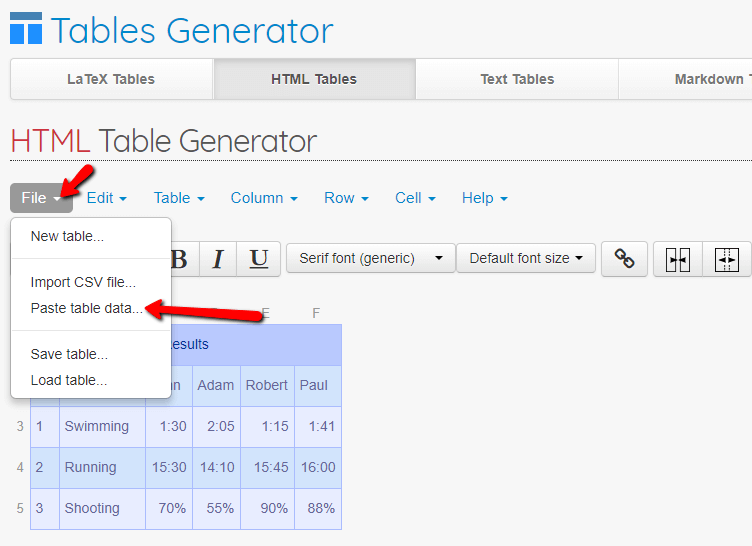
2. Sie können jetzt die gesamte Tabelle vollständig erstellen.
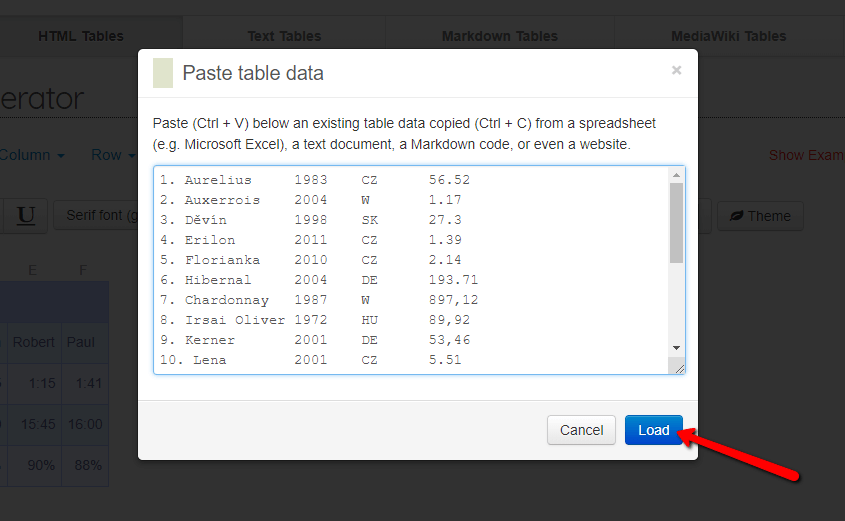
Wenn Sie einige Daten beispielsweise in Word oder Excel oder in einem anderen Dokument gespeichert haben, können Sie mit dieser Funktion Daten importieren und die Erstellung einer Tabelle beschleunigen.


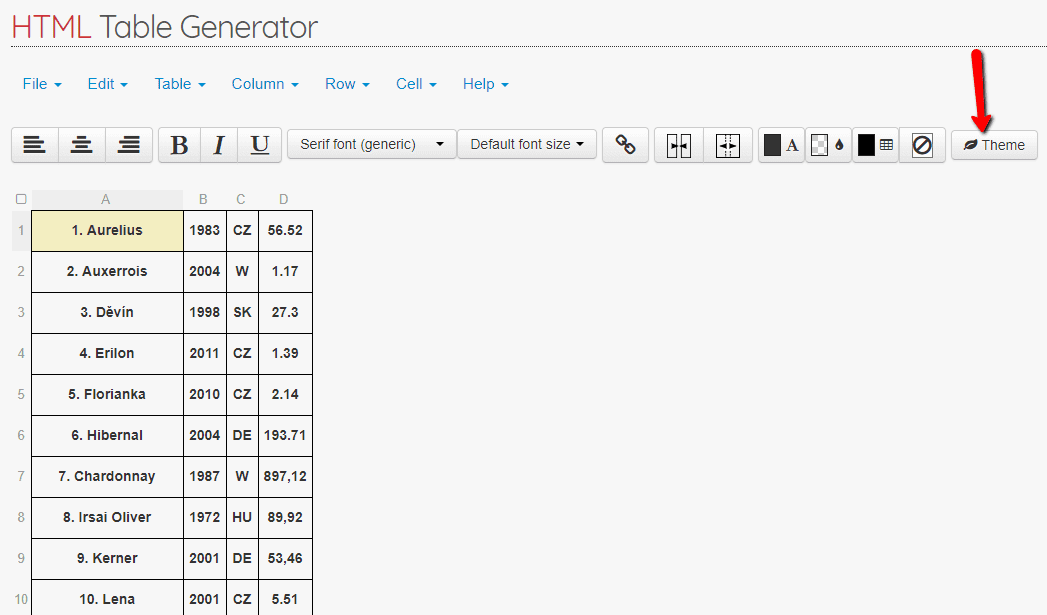
3. Sie können die Tabelle nach Ihren Wünschen anpassen. Sie können beispielsweise eines der Themen verwenden, um das Erscheinungsbild Ihrer Tabelle zu verbessern.

4. Wenn Sie mit der erstellten Tabelle zufrieden sind, stellen Sie sie responsive ein, die Tabelle wird dann automatisch an die Bildschirmgröße angepasst (Mobiltelefon, Tablet usw.).
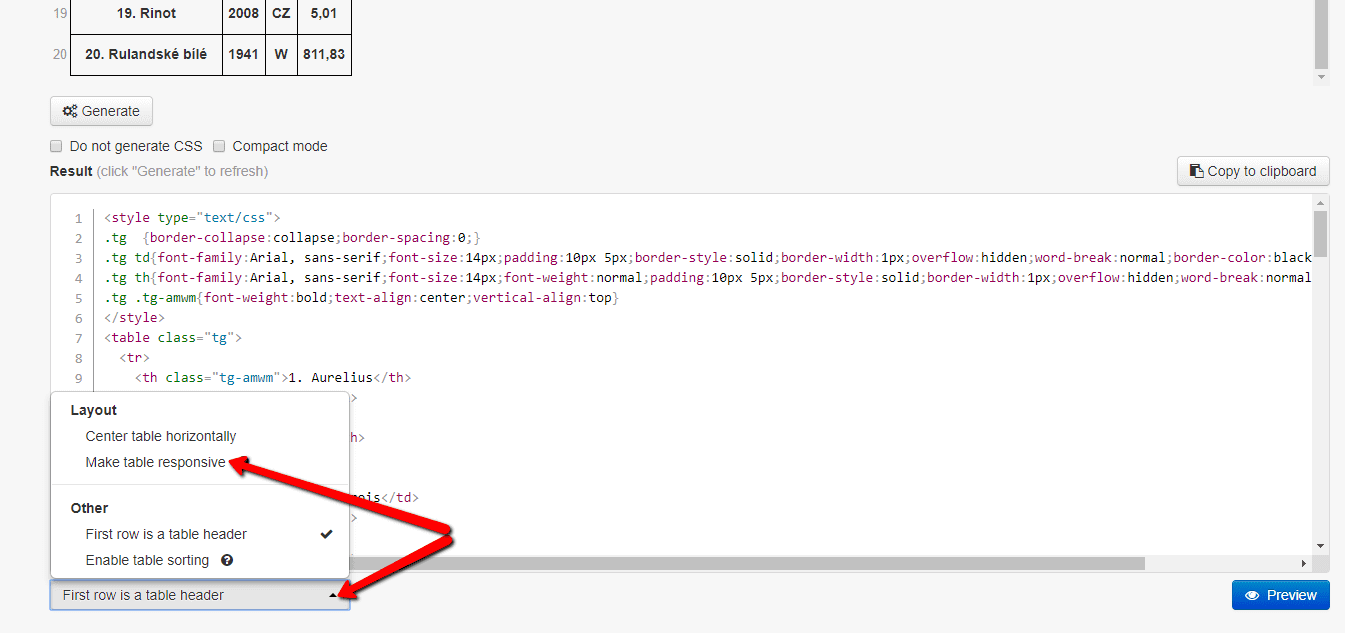

5. Sie haben den HTML-Code der Tabelle bereit. Klicken Sie auf “Generate” und kopieren Sie den Code, indem Sie auf die Schaltfläche “Copy to clipboard“ klicken.
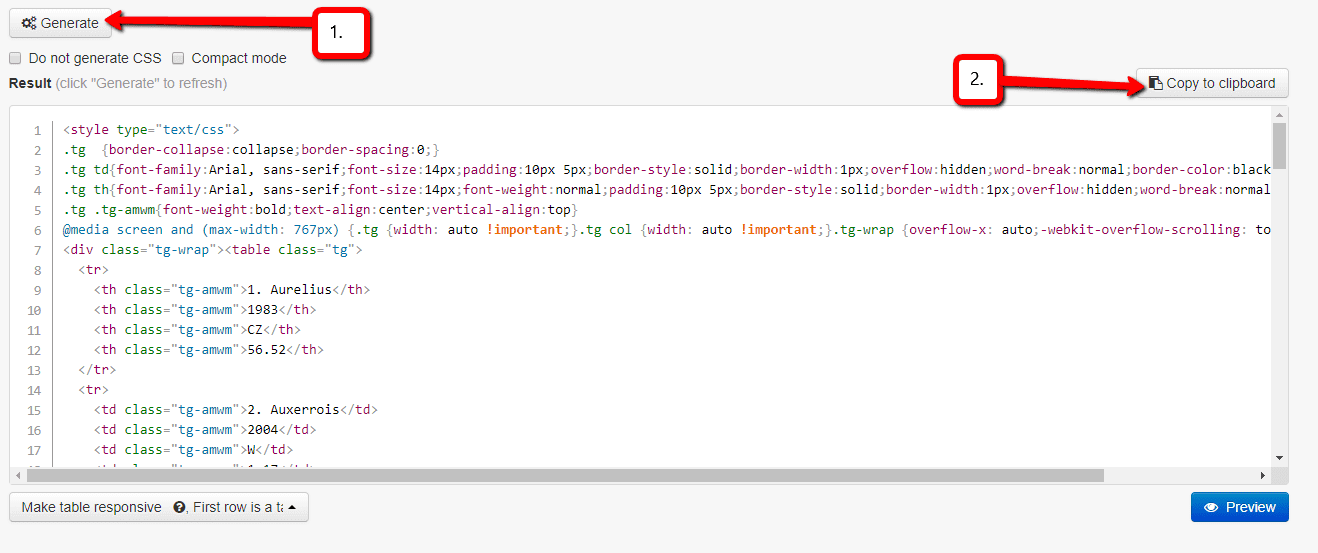

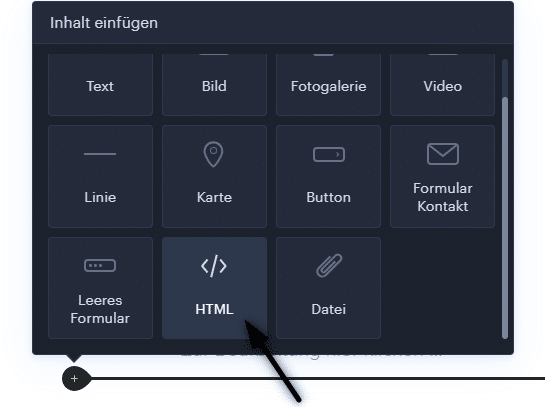
6.Fügen Sie den HTML-Code in Ihre Webnode-Website ein.
Verwenden Sie die Funktion „HTML„.
7. Veröffentlichen Sie Änderungen mit der Schaltfläche „Publizieren„

Sie sind fertig. Gut gemacht! 🙂
TIPP:
Fügen Sie den HTML-Code der Tabelle zwischen den Tags (<center> </ center>) ein, und Ihre Tabelle wird zentriert.
… Öffnen Sie einfach die HTML-Funktion in Webnode und schreiben Sie <center>. Fügen Sie dann den Tabellencode ein und geben Sie </ center> ein
<center> GEBEN SIE DEN TABELLENCODE HIER EIN </center>
GEBEN SIE DEN TABELLENCODE HIER EIN
Auf Ihrer Website wird jetzt eine Tabelle angezeigt. Die Tabelle könnte beispielsweise folgendermaßen aussehen:
| Moštové bílé odrůdy | |||
|---|---|---|---|
| Název odrůdy | Rok registrace | původ | osázená plocha ha |
| 1. Aurelius | 1983 | CZ | 56.52 |
| 2. Auxerrois | 2004 | W | 1.17 |
| 3. Děvín | 1998 | SK | 27.3 |
| 4. Erilon | 2011 | CZ | 1.39 |
| 5. Florianka | 2010 | CZ | 2.14 |
| 6. Hibernal | 2004 | DE | 193.71 |
| 7. Chardonnay | 1987 | W | 897,12 |
| 8. Irsai Oliver | 1972 | HU | 89,92 |
| 9. Kerner | 2001 | DE | 53,46 |
| 10. Lena | 2001 | CZ | 5.51 |
| 11. Malverina | 2001 | CZ | 11,54 |
| 12. Medea | 2014 | CZ | 0,24 |
| 13. Mery | 2015 | CZ | 0 |
| 14. Muškát moravský | 1987 | CZ | 425,76 |
| 15. Muškát Ottonel | 1952 | W | 63,4 |
| 16. Műller Thurgau | 1941 | W | 1545,9 |
| 17. Neuburské | 1941 | W | 301,1 |
| 18. Pálava | 1977 | CZ | 452,05 |
| 19. Rinot | 2008 | CZ | 5,01 |
| 20. Rulandské bílé | 1941 | W | 811,83 |
| 21. Rulandské šedé | 1941 | W | 912,49 |
| 22. Ryzlink rýnský | 1941 | W | 1225,99 |
| 23. Ryzlink vlašský | 1941 | W | 1195,73 |
| 24. Sauvignon | 1952 | W | 944,27 |
| 25. Savilon | 2010 | CZ | 6,79 |
| 26. Svojsen | 2015 | CZ | 0 |
| 27. Sylvánské zelené | 1941 | W | 139,74 |
| 28. Tramín červený | 1941 | W | 657,99 |
| 29. Tristar | 2013 | CZ | 0,06 |
| 30. Veltlínské červené rané | 1952 | W | 181,62 |
| 31. Veltlínské zelené | 1941 | W | 1665,99 |
| 32. Veritas | 2001 | CZ | 0,35 |
| 33. Vesna 2012 CZ 0,35 0,00 | 2012 | CZ | 0,35 |
| 34. Vrboska 2004 CZ 0,65 0,00 | 2004 | CZ | 0,65 |
| Celkem: | 11878,62 | ||
| AT – Rakousko, CZ – Česká republika, DE – Německo, HU – Maďarsko, SK – Slovensko, | |||
Weitere tolle Tutorials


3 simple ways how to embed an online MP3 player on the web in Webnode
Are you looking for a simple way how to embed MP3 player on Webnode site? In this tutorial I will show you three easy ways (free of charge). 1. The first way is to use the function directly in the Webnode editor. Click "+" and "File". Mp3 will start in a...

How to add a custom search box to my website/e-shop in Webnode?
In the tutorial How to add a product searchbox in Webnode e-shop? I've shown a simple solution for adding your own search engine. Let's take a look at another search engine and your other options.Create your own search box using Google Custom Search Engine Find...

How to add an online reservation system to Webnode? It’s Free!
Do you need an powerful online booking reservation system? Works perfectly with Webnode.Whatever you do, Reservio is a great choice for organizing your time! 🙂 And what does the Reservio online booking system offer to you? a clear calendar where you can find...

How to connect own domain or subdomain with Webnode? Set DNS records easily
Do you want to change the URL of the "webnode" website to your own domain f.e "mydomain.com" or "e-shop.mydomain.com" ? Using your own domain is a feature included in the Premium plans: Limited, Mini, Standard, and Profi. After purchasing one of the Premium...

12 biggest free pictures stocks for commercial use. Pictures for free.
In this tutorial you will find links to 12 free photo services. All images are licensed under CC0 license. ✔ Images are for commercial use. If you've downloaded images through Google, it's wrong! When you are creating own website, I recommend you these 12 free sources...

How to change the URL address of a Webnode page, article or product?
Do you need to change the URL for a Webnode page? In this tutorial, I'll show you how to change the URL of a page, article, and product in Webnode. 1. Change the URL of the page. In the top editor bar, click on "Pages" - "Choose a page" - "SEO page setup". and...

How to change the color of a label when copying text?
Are you looking for a way to change the color of the label (mark) when copying? This color is preset in blue. In this tutorial, I'll show you how you can easily change the color and thus improve the look of your site. #Let's do it 🙂 1. Log in to editing the...

How to add Webnode website to Search engine Bing.com?
Looking for a way to add your website to Bing.com? Read more! In tutorial How to add a Webnode website to Google Search? I have shown how to link your site to Google. (automatic index) Now let's look at Bing.com. Bing.com is the second most used search engine and...

How to change the image for a shared Facebook link in Webnode?
You do not see the (preview) image when sharing a website in Facebook? If you share your website link on Facebook, it may happen that no picture appears or an image you do not want appears. In the following steps, you'll learn how to change the image for the shared...

