


Müssen Sie die URL einer Webnode-Seite ändern?
In diesem Tutorial zeigen wir Ihnen, wie Sie die URL für eine Seite, einen Artikel und ein Produkt ändern.
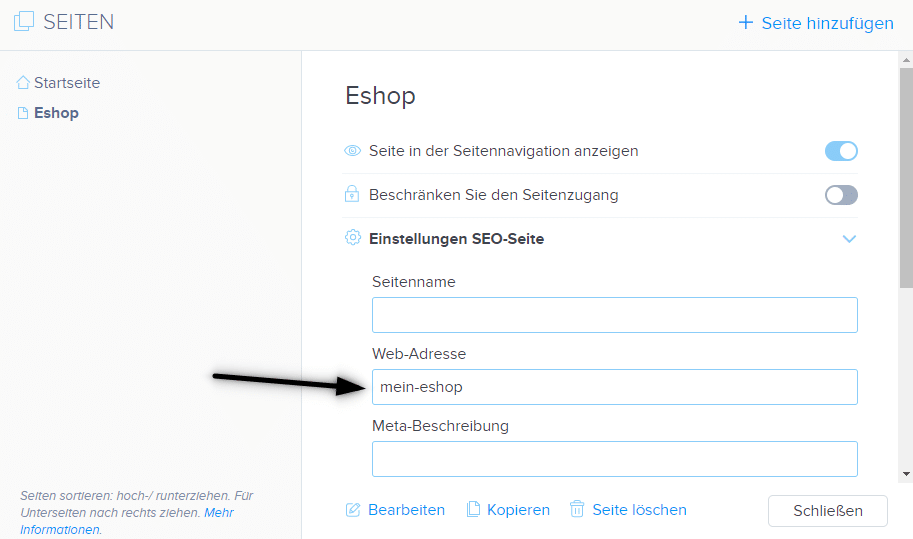
1. Änderung der URL einer Webseite.
Klicken Sie in der oberen Leiste des Editors auf „Seiten“ – „Seite auswählen“ – „Einstellungen SEO-Seite„
und überschreiben Sie die Web-Adresse der Seite.
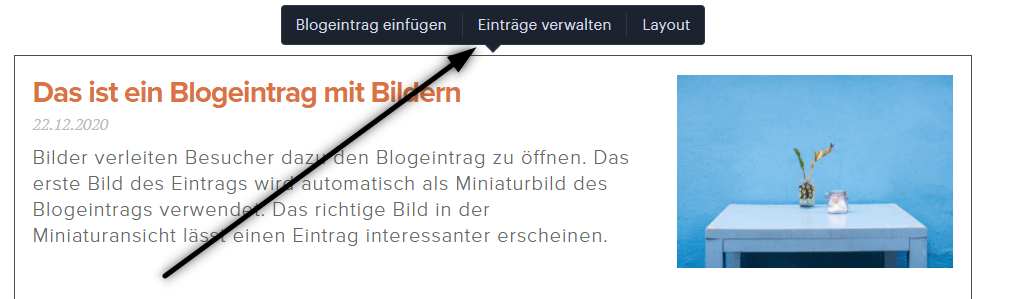
2. Änderung der URL für den Blog-Artikel.
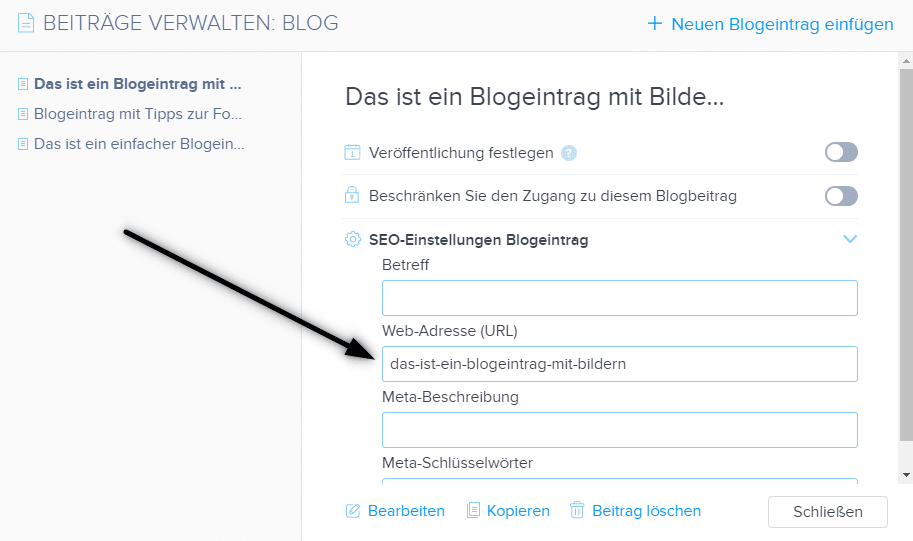
Klicken Sie beim Auflisten von Artikeln auf „Einträge verwalten„, wählen Sie dann den Artikel und „SEO-Einstellungen Blogeintrag“ aus.
und überschreiben Sie die Web-Adresse des Eintrags.
3. Änderung der URL-Adresse für das Produkt im E-Shop
Klicken Sie in der oberen Leiste des Editors auf „Produkte“ – „Produkt auswählen“ – „Erweitert“ – „Web-Adresse“ und bearbeiten Sie die URL.
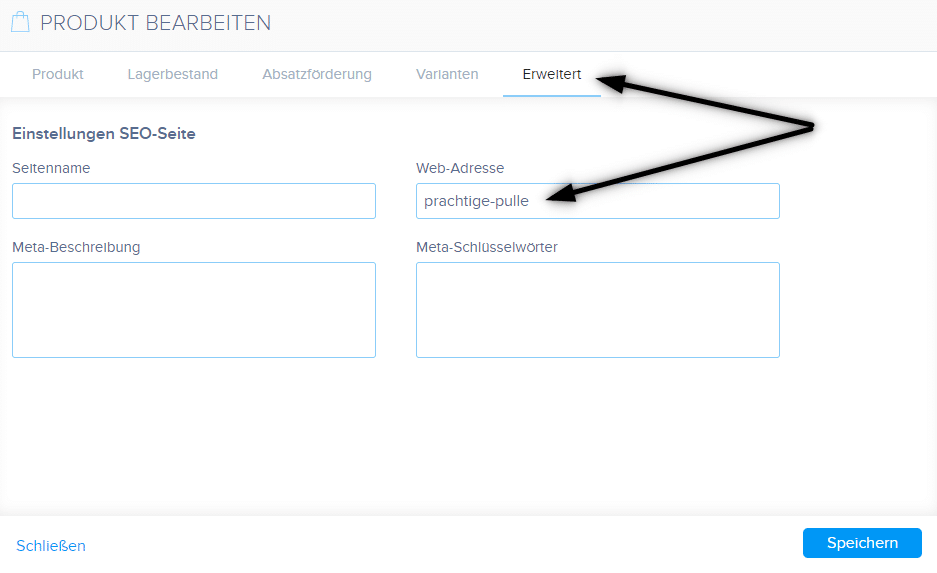
TIPP: URL darf keine Leerzeichen / Umlaute/ Sonderzeichen enthalten. Geben Sie beim Erstellen einer URL-Adresse die Adresse ohne diakritische Zeichen ein und verwenden Sie Bindestriche, z. B. „neuer-artikel“.
TIPP 2: Die Startseite-URL kann nicht geändert werden.
Weitere tolle Tutorials


How to add pencil animation (type&swipe) to a website/eshop in WEBNODE?
Do you want to attract your audience? Would you like to improve your website? I have created a code for you that will allow you to display an animation of a writing pencil on your website or e-shop in WEBNODE. You can choose your own text in the code so...
Jak na web ve Webnode přidat animaci písajíci tužky?
Chcete zaujmout Vaše publikum? Chtěli byste si vylepšit Váš web? Vytvořil jsem pro Vás kód, který umožní na Vašem webu nebo e-shopu ve Webnode zobrazit animaci písajúcej tužky. V kódu si můžete zvolit vlastní text, aby tužka psala přesně to, co chcete!...
Ako na web vo WEBNODE pridať animáciu písajúcej ceruzky?
Chcete zaujať Vaše publikum? Chceli by ste si vylepšiť Váš web? Vytvoril som pre Vás kód, ktorý umožní na Vašom webe , či e-shope vo WEBNODE zobraziť animáciu písajúcej ceruzky. V kóde si môžete zvoliť vlastný text, aby ceruzka písala presne to, čo chcete! :)...
How to add FAQ bookmarks to your website/e-shop in Webnode?
Would you like to add a FAQ bookmarks to the WEBNODE website or e-shop?In tutorial How to show and hide text after clicking the "More text" button? I showed you an easy way to hide text on the web. In this tutorial, I will show you how to use my code to create your...
Jak přidat FAQ záložky na web ve Webnode?
Chtěli byste si na webové stránky ve Webnode přidat FAQ ?V návodu Jak zobrazit a skrýt text po kliknutí na tlačítko "Více textu"? jsem Vám ukázal jednoduchý způsob jak na webu skrýt text. V tomto návodu si ukážeme, jak je možné pomocí mého kódu vytvořit na webu...
Kuinka helposti muokkaan 404-virhesivun sisältöä Webnodella
Haluatko muokata 404-sivua (page not found) Webnodella? Tämä opas kuvailee, kuinka pystyt muokkaamaan 404-sivua Webnodella. 404-virhesivu on tärkeä, mikäli joku linkki sivuillasi ei ole enää toiminnassa. Virhesivu tulee näkyviin aina kun kävijä vierailee jo ei...
Ako pridať rozbaľovacie záložky (FAQ) na web vo WEBNODE ?
Chceli by ste si na webové stránky vo Webnode pridať FAQ ?V návode Ako zobraziť a skryť text po kliknutí na tlačítko “Viac textu” ? som Vám ukázal jednoduchý spôsob ako na webe skryť text. V tomto návode si ukážeme, ako je možné pomocou môjho kódu vytvoriť na...

How to create a simple business card website for FREE?
Create your first bussiness card website with WebnodeWhat is a business card website? A business card website is a simple website that briefly and clearly presents your services or products. It is a simple website that is used to obtain basic information about your...

Jak vytvořit jednoduchý vizitkový web?
Jak vytvořit jednoduchý vizitkový web? (scroll-ovací web)Co je to vizitkový web? Vizitkový web je jednoduchý web, který stručně a jasně představuje Vaše služby, či produkty. Je to jednoduchá webová stránka, která slouží pro získání základních informací o Vaší firmě....

