



Möchten Sie die URL Ihrer Webnode-Website in Ihre eigene Domain ändern, z. B. „meinweb.de“ oder „e-shop.meinweb.de“? Lesen Sie weiter!
Die Verwendung Ihrer eigenen Domain ist eine Premium-Funktion von Webnode, die Teil der Limited-, Mini-, Standard- und Profi Premium-Pakete ist.
Nach dem Kauf eines der Premium-Pakete können Sie dem Projekt eine eigene Domain zuweisen und die erforderlichen DNS-Einträge zum Einrichten einer Domain beim aktuellen Registrar Ihrer Domain erhalten.
Wenn Sie bereits Premium-Dienste gekauft haben, können Sie den Anweisungen folgen.
Anweisungen zum Zuweisen Ihrer eigenen Domain / Subdomain und zum Anzeigen von DNS-Einträgen in Webnode
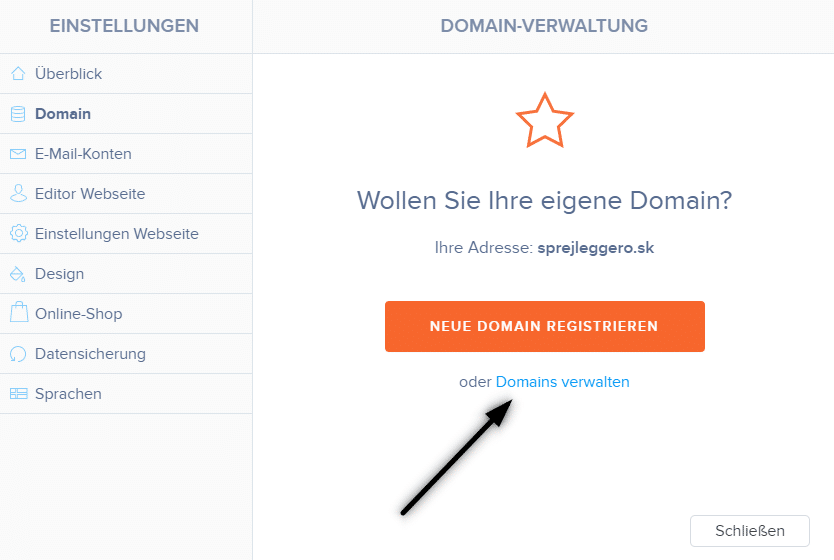
1. Klicken Sie in der oberen Leiste des Editors auf „Einstellungen“ – „Domains“ – „bestehende Domain nutzen„.
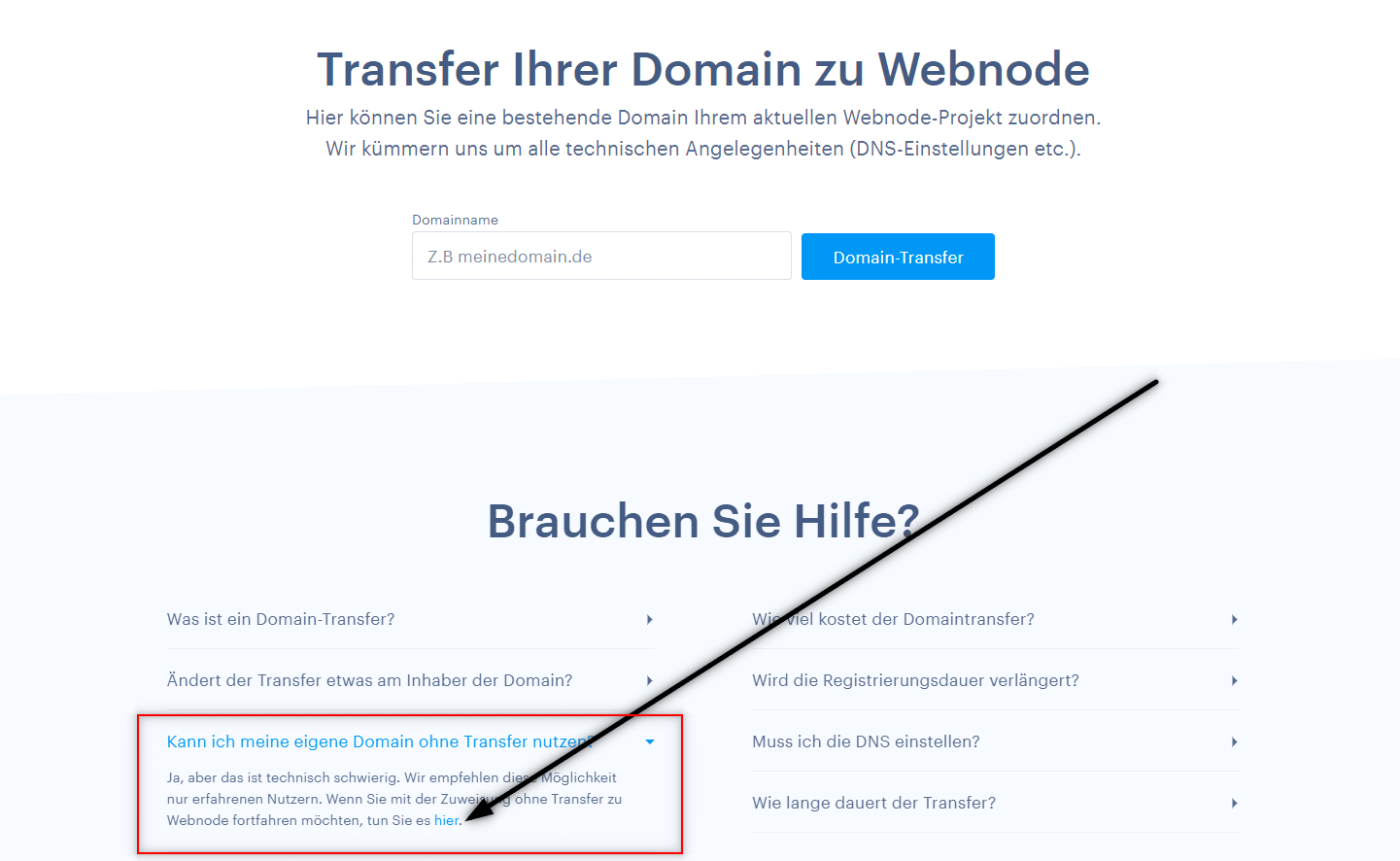
2. Scrollen Sie auf der Seite nach unten, erweitern Sie den Text “Kann ich meine eigene Domain ohne Transfer nutzen“ und klicken Sie im Text auf den Link hier.
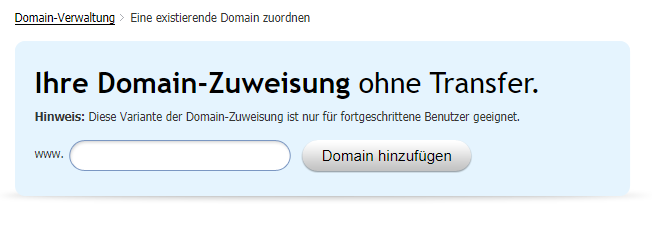
3. Geben Sie Ihren Domainnamen ein und klicken Sie auf „Domain hinzufügen„
4. Nach dem Zuweisen einer Domain sehen Sie die Anleitung. Stellen Sie die aufgelisteten DNS-Einträge für die Domain ein oder leiten Sie sie an den Support Ihres Registrars weiter und fragen Sie die Techniker nach den richtigen Einstellungen.
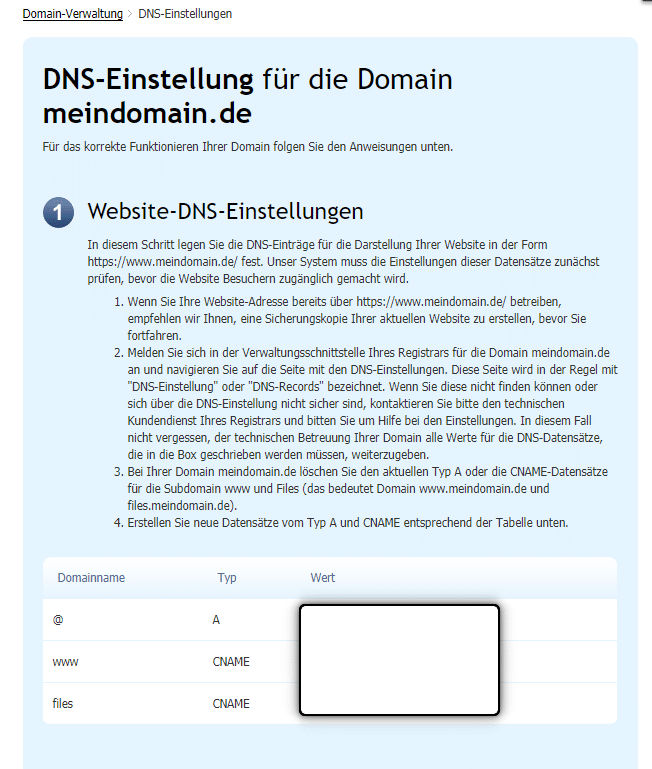
*Die DNS-Einträge sind für jede Domain unterschiedlich, sodass das Bild nur zur Veranschaulichung dient.
DNS-Einträge für eine Subdomain
Wenn Sie die Website unter dem Namen einer Subdomain wie „eshop.meinweb.de“ anzeigen möchten,
weisen Sie dem Projekt einfach eine Subdomain zu (gemäß den obigen Anweisungen) und:
Für die Subdomain „eshop.meinweb.de“ sehen die DNS-Einträge folgendermaßen aus:
- eshop A 192.168.xx.xx
- www.eshop CNAME meinweb.webnode.com.
- files.eshop CNAME files.meinweb.webnode.com.
Weitere tolle Tutorials


How to change the URL address of a Webnode page, article or product?
Do you need to change the URL for a Webnode page? In this tutorial, I'll show you how to change the URL of a page, article, and product in Webnode. 1. Change the URL of the page. In the top editor bar, click on "Pages" - "Choose a page" - "SEO page setup". and...

How to download an invoice in Webnode?
Are u looking for your invoice for paid services at Webnode? In this tutorial I will show you exactly where you will find your invoice in Webnode. You can download the invoice directly in your project's administration. (cms) Important note: Only the site owner (the...

How to easily edit the content of 404 page in Webnode?
Looking for a way to edit page 404 (page not found) in Webnode? In this tutorial, you will learn how to edit the 404 Webnode page. Page 404 is important if a link to your site no longer exists. Page 404 will always appear whenever a visitor visits a non-existent page...

How To Create A Professional Email Signature? Simply and FREE
Looking for a easy way to create an email signature? (Gmail, Webmail, Outlook, etc.) Email signature is an inevitable part of modern communication between the customer and the entrepreneur. Business email will increase credibility in the eyes of your potential...

How to add a social network icons (FB and Instagram) to the top of the Webnode website?
You are looking for a way to insert the social icons at the Webnode website? (to the top of the site) In tutorials How do I easily link my Facebook to my website in Webnode? and How to link your Instagram with website in Webnode? I've shown how you can link...

How to add a conversion code in Webnode?
Looking for a way to embed a conversion code for Webnode from Adwords, etc. ? What is that conversion? Simply: Conversion is something you want a visitor to do on your site (filling in a form, purchasing a product in an e-shop, etc.) Conversion is the...

How to add link to an email and phone number in Webnode?
Do you need to add a link to an email or phone number on the site created with Webnode? Email communication is a fast, simple and most commonly used link between you and your customers. For most potential customers, however, the main task is time, which can lead to...

How to add a Webnode website to Google Search?
Add a Webnode website to Google Search Engine We're all familiar with Google search engine, and it's not necessary to introduce it in any way. Search engines roam web pages regularly, and when they find a new site, they automatically add it to their search results. If...

How to create anchor links in Webnode? Click&Scroll
Videotutorial with ENG subtitles The anchor works as a link within a single page. You do not see a different page (web) through the link, but you will be taken to another place on the page you are currently viewing. Anchor formation (tabs) is divided into two...

