



Brauchen Sie Ihrer Webnode-Website eine Tabelle hinzufügen?
Diese Funktion ist im Webnode-Editor noch nicht verfügbar, die Tabelle kann jedoch mit einer externen Anwendung erstellt werden – tablesgenerator.com.
Anweisungen zum Erstellen und Einfügen einer Tabelle auf Webnode-Websites
Anweisungen zum Erstellen und Einfügen einer Tabelle auf Webnode-Websites.
1. Klicken Sie auf diesen Link, der Sie zu einem externen Tabellenanbieter weiterleitet.
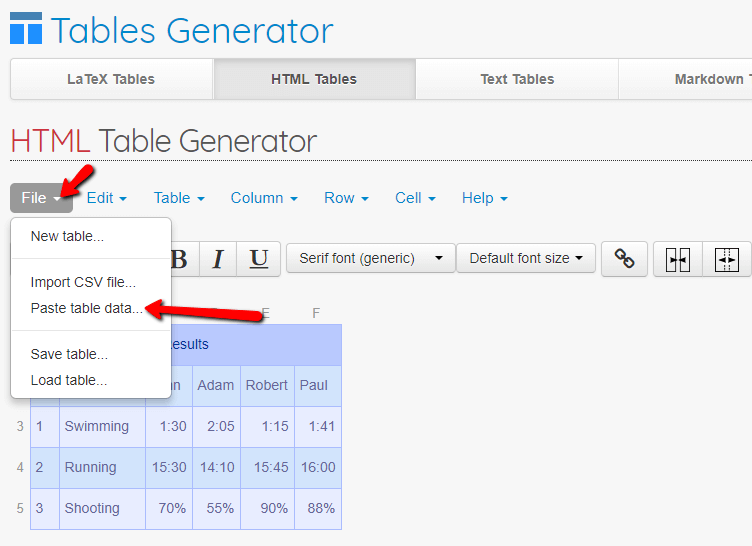
2. Sie können jetzt die gesamte Tabelle vollständig erstellen.
Wenn Sie einige Daten beispielsweise in Word oder Excel oder in einem anderen Dokument gespeichert haben, können Sie mit dieser Funktion Daten importieren und die Erstellung einer Tabelle beschleunigen.

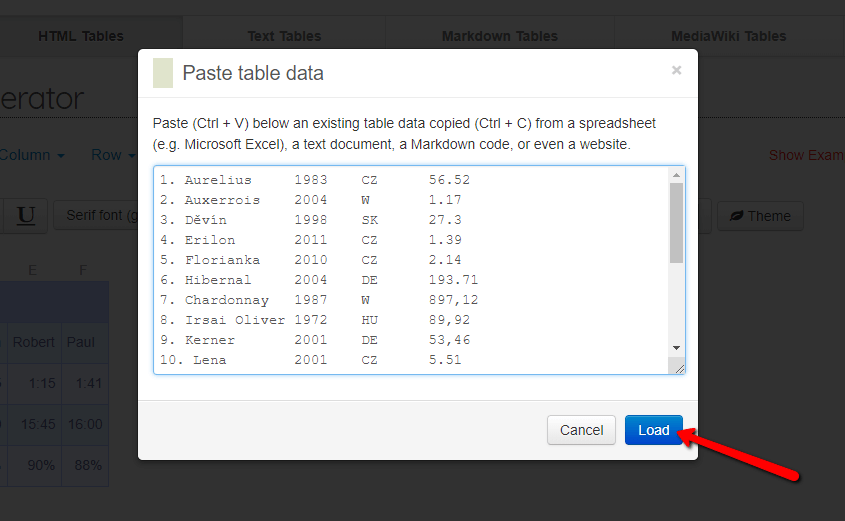

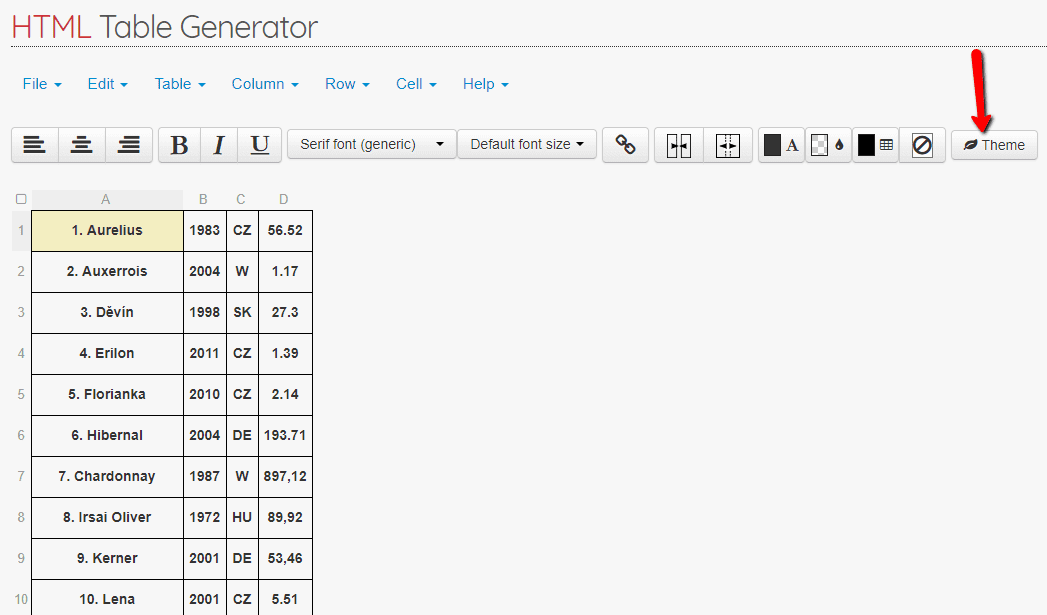
3. Sie können die Tabelle nach Ihren Wünschen anpassen. Sie können beispielsweise eines der Themen verwenden, um das Erscheinungsbild Ihrer Tabelle zu verbessern.

4. Wenn Sie mit der erstellten Tabelle zufrieden sind, stellen Sie sie responsive ein, die Tabelle wird dann automatisch an die Bildschirmgröße angepasst (Mobiltelefon, Tablet usw.).
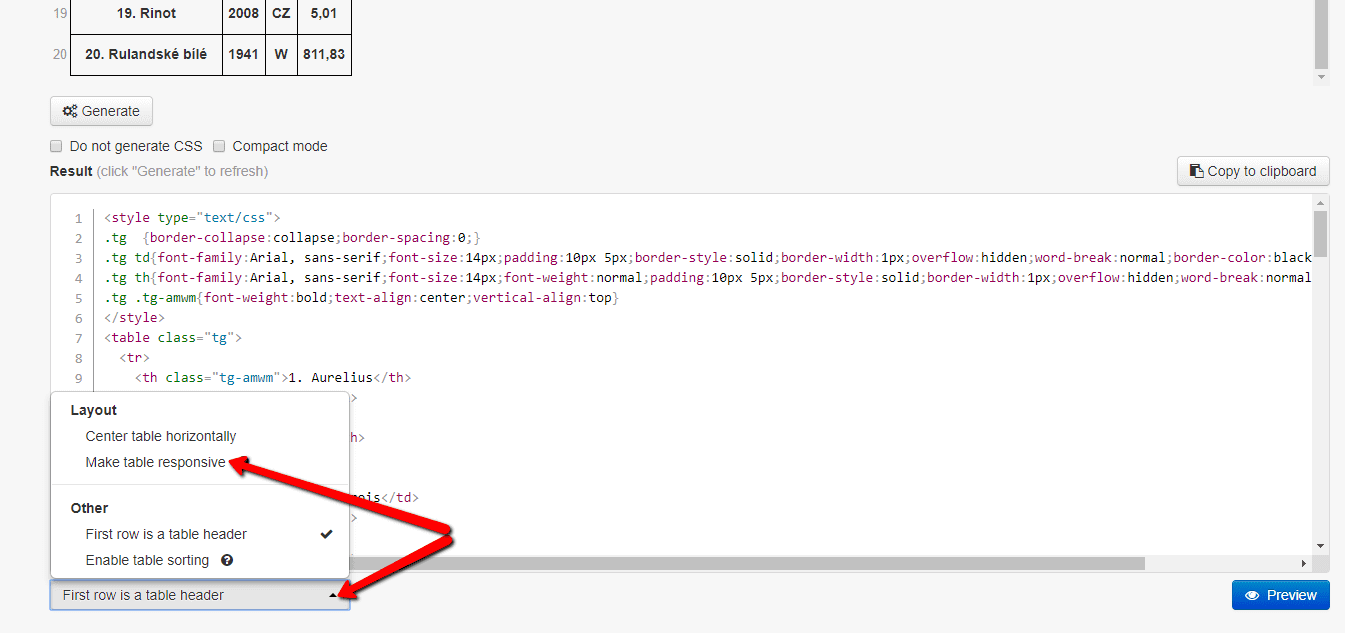

5. Sie haben den HTML-Code der Tabelle bereit. Klicken Sie auf “Generate” und kopieren Sie den Code, indem Sie auf die Schaltfläche “Copy to clipboard“ klicken.
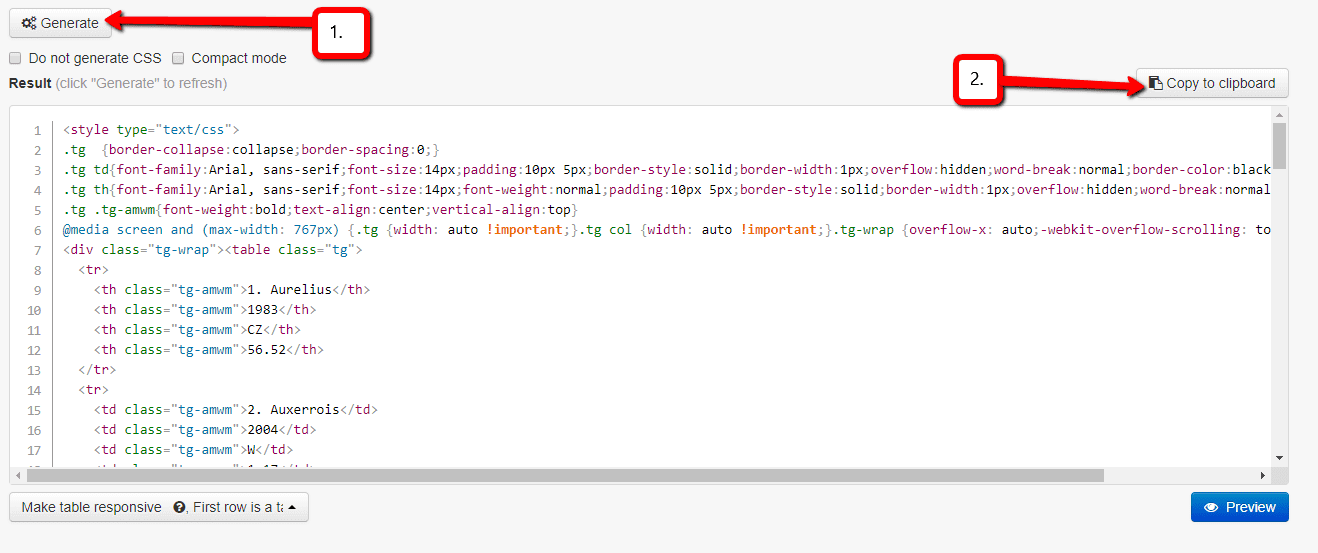

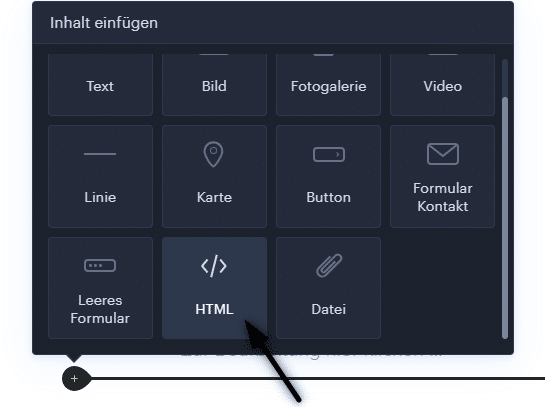
6.Fügen Sie den HTML-Code in Ihre Webnode-Website ein.
Verwenden Sie die Funktion „HTML„.
7. Veröffentlichen Sie Änderungen mit der Schaltfläche „Publizieren„

Sie sind fertig. Gut gemacht! 🙂
TIPP:
Fügen Sie den HTML-Code der Tabelle zwischen den Tags (<center> </ center>) ein, und Ihre Tabelle wird zentriert.
… Öffnen Sie einfach die HTML-Funktion in Webnode und schreiben Sie <center>. Fügen Sie dann den Tabellencode ein und geben Sie </ center> ein
<center> GEBEN SIE DEN TABELLENCODE HIER EIN </center>
GEBEN SIE DEN TABELLENCODE HIER EIN
Auf Ihrer Website wird jetzt eine Tabelle angezeigt. Die Tabelle könnte beispielsweise folgendermaßen aussehen:
| Moštové bílé odrůdy | |||
|---|---|---|---|
| Název odrůdy | Rok registrace | původ | osázená plocha ha |
| 1. Aurelius | 1983 | CZ | 56.52 |
| 2. Auxerrois | 2004 | W | 1.17 |
| 3. Děvín | 1998 | SK | 27.3 |
| 4. Erilon | 2011 | CZ | 1.39 |
| 5. Florianka | 2010 | CZ | 2.14 |
| 6. Hibernal | 2004 | DE | 193.71 |
| 7. Chardonnay | 1987 | W | 897,12 |
| 8. Irsai Oliver | 1972 | HU | 89,92 |
| 9. Kerner | 2001 | DE | 53,46 |
| 10. Lena | 2001 | CZ | 5.51 |
| 11. Malverina | 2001 | CZ | 11,54 |
| 12. Medea | 2014 | CZ | 0,24 |
| 13. Mery | 2015 | CZ | 0 |
| 14. Muškát moravský | 1987 | CZ | 425,76 |
| 15. Muškát Ottonel | 1952 | W | 63,4 |
| 16. Műller Thurgau | 1941 | W | 1545,9 |
| 17. Neuburské | 1941 | W | 301,1 |
| 18. Pálava | 1977 | CZ | 452,05 |
| 19. Rinot | 2008 | CZ | 5,01 |
| 20. Rulandské bílé | 1941 | W | 811,83 |
| 21. Rulandské šedé | 1941 | W | 912,49 |
| 22. Ryzlink rýnský | 1941 | W | 1225,99 |
| 23. Ryzlink vlašský | 1941 | W | 1195,73 |
| 24. Sauvignon | 1952 | W | 944,27 |
| 25. Savilon | 2010 | CZ | 6,79 |
| 26. Svojsen | 2015 | CZ | 0 |
| 27. Sylvánské zelené | 1941 | W | 139,74 |
| 28. Tramín červený | 1941 | W | 657,99 |
| 29. Tristar | 2013 | CZ | 0,06 |
| 30. Veltlínské červené rané | 1952 | W | 181,62 |
| 31. Veltlínské zelené | 1941 | W | 1665,99 |
| 32. Veritas | 2001 | CZ | 0,35 |
| 33. Vesna 2012 CZ 0,35 0,00 | 2012 | CZ | 0,35 |
| 34. Vrboska 2004 CZ 0,65 0,00 | 2004 | CZ | 0,65 |
| Celkem: | 11878,62 | ||
| AT – Rakousko, CZ – Česká republika, DE – Německo, HU – Maďarsko, SK – Slovensko, | |||
Weitere tolle Tutorials


How to add a discussion on a Webnode website? (DISQUS)
YouTube Video Tutorial (english subtitles) How to easily create a discussion using - disqus.com In this tutorial, you will learn how to place a discussion on the Webnode website so yours visitors can add comments to the site. We will use an external application - HTML...

Jak Vytvořit Profesionální E-mailový Podpis? Jednoduše a ZDARMA
Hledáte způsob jak si vytvořit emailový podpis? (Gmail, Webmail, Outlook apod) Emailový podpis je nevyhnutelnou součástí moderní komunikace mezi zákazníkem a podnikatelem. Firemní email zvýší důvěryhodnost v očích Vašeho potencionálního klienta. Vytvořte si...

How to easily set up Google Map in Webnode?
Your map in Webnode does not work? Sometimes, when you type an address, the system can not find a specific address, so the map does not work in the published version of the site. In this tutorial i will show u two solutions to fix the problem. So follow these...

How to add an online chat to the Webnode website? FREE!
Do you want to add an online chat on your Webnode website for faster communication with your clients? In this tutorial, I will show you how to easily get a code for an online chat on your website. 1. The first step is registering on the official...

How to create your own company logo? It’s for free
Do you want to create own company logo? You can create own brand new logo in few minutes using free service. I highly recommend it. Its free. 1. Click on this link, which will redirect to official website of this awesome service: Logo Maker. 2. Choose...

How to add a Scroll to Top button to website in Webnode?
Videotutorial in Slovak language with ENGLISH subtitlesDo you want to add a Scroll Top button on your Webnode website? In tutorial "How to create anchor links in Webnode? Click&Scroll" i've shown how to redirect (scroll) to a specific place on the web. An...

How to add a responsive table to a Webnode website?
Do you need to add a table to your Webnode website? In Webnode editor this function is missing, but the table can be created using external app - tablesgenerator.com. Instructions for creating and inserting a spreadsheet for Webnode Webpages. 1....

How to easily set an automatic redirection on your Webnode website?
Looking for a way to automatically redirect your website visitor to another website? (URL address) Follow these steps: 1. Edit and copy the HTML code below. In the code, edit the URL value. In place of the URL, enter the URL address (website) to which you want...

