



Müssen Sie die URL einer Webnode-Seite ändern?
In diesem Tutorial zeigen wir Ihnen, wie Sie die URL für eine Seite, einen Artikel und ein Produkt ändern.
1. Änderung der URL einer Webseite.
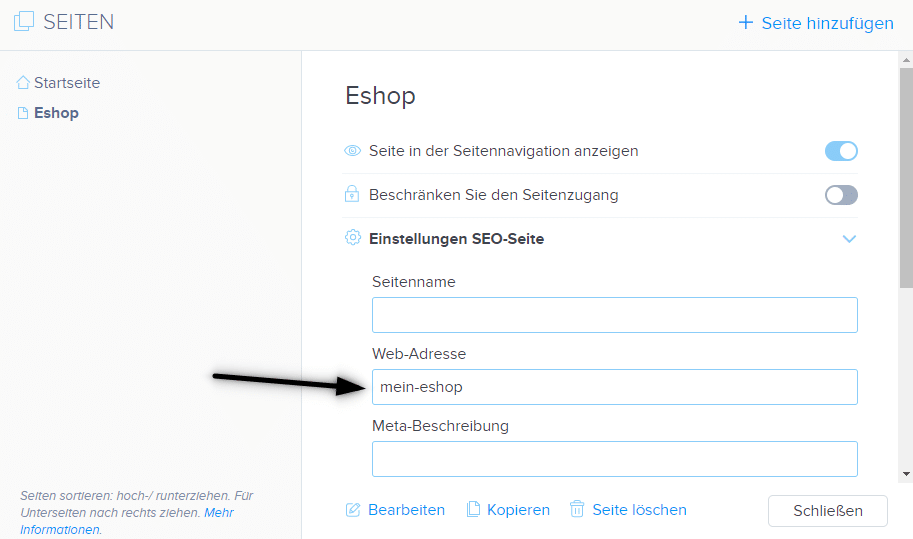
Klicken Sie in der oberen Leiste des Editors auf „Seiten“ – „Seite auswählen“ – „Einstellungen SEO-Seite„
und überschreiben Sie die Web-Adresse der Seite.
2. Änderung der URL für den Blog-Artikel.
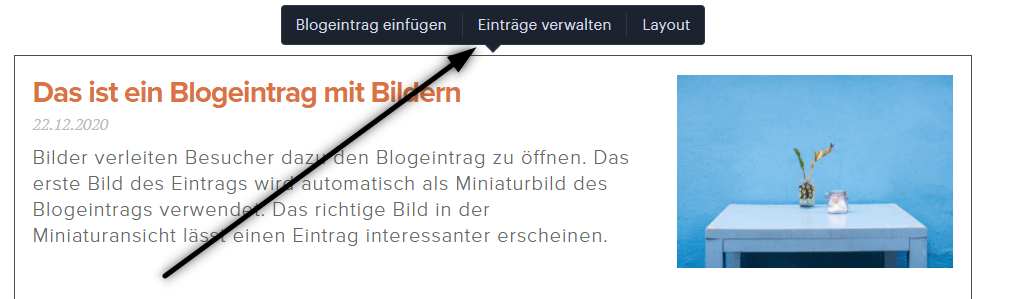
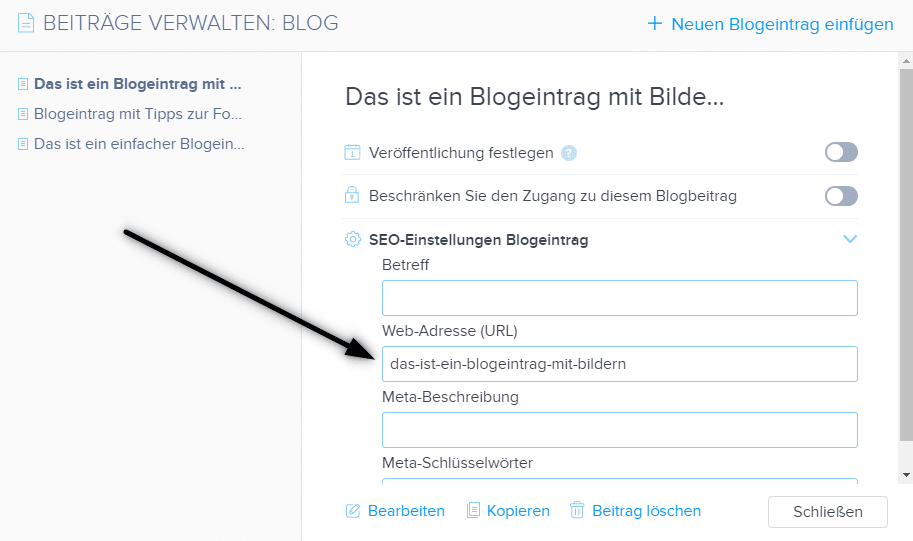
Klicken Sie beim Auflisten von Artikeln auf „Einträge verwalten„, wählen Sie dann den Artikel und „SEO-Einstellungen Blogeintrag“ aus.
und überschreiben Sie die Web-Adresse des Eintrags.
3. Änderung der URL-Adresse für das Produkt im E-Shop
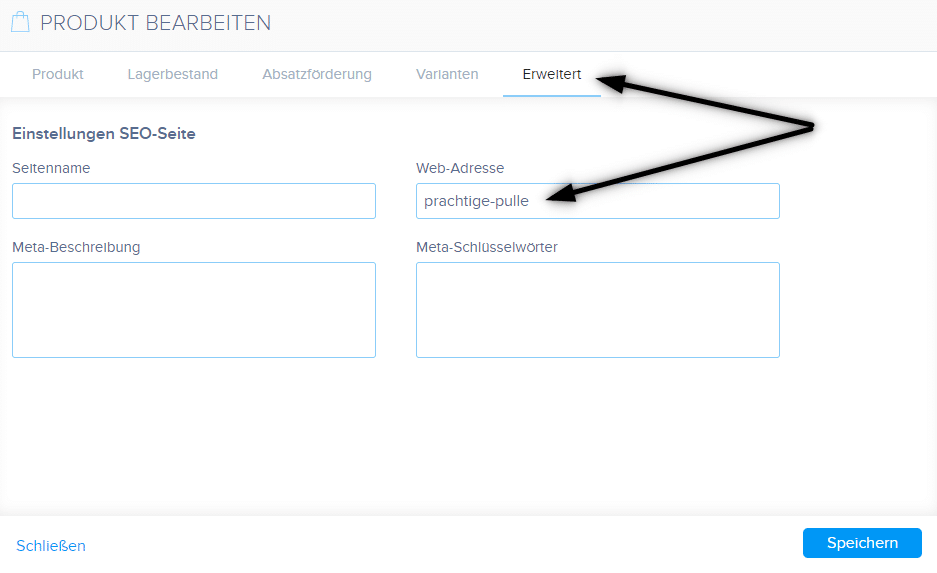
Klicken Sie in der oberen Leiste des Editors auf „Produkte“ – „Produkt auswählen“ – „Erweitert“ – „Web-Adresse“ und bearbeiten Sie die URL.
TIPP: URL darf keine Leerzeichen / Umlaute/ Sonderzeichen enthalten. Geben Sie beim Erstellen einer URL-Adresse die Adresse ohne diakritische Zeichen ein und verwenden Sie Bindestriche, z. B. „neuer-artikel“.
TIPP 2: Die Startseite-URL kann nicht geändert werden.
Weitere tolle Tutorials

Kuinka luon ankkurilinkin
Videotutoriali englanninkielisillä tekstityksillä Ankkuri toimii linkkinä samalla sivulla. Linkin kautta et näe eri sivua (verkkosivua), vaan sinut siirretään toiseen kohtaan sillä sivulla, jota parhaillaan katsot. Ankkurin (välilehden) muodostaminen...

How to add falling confetti to your WEB/E-SHOP ?
How to add animation - falling confetti to Webnode websites?I got an question in my Webnode free support if it is possible to add an animation of falling confetti on the Webnode website. Yes, it is possible - for everyone who is looking for "falling confetti on the...

Jak na web pridať padajíci konfety?
Jak na webové stránky vo Webnode pridať animáciu - padajíci konfety?Do mé Webnode poradny přišla otázka, zda je možné na webu ve Webnode přidat animaci padajících konfet. Ano je to možné - pro všechny, kteří hledají "padající konfety na web" jsem připravil kód, který...
Ako na web pridať padajúce konfety?
Ako na webové stránky vo Webnode pridať animáciu - padajúce konfety?Do mojej Webnode poradne prišla otázka, či je možné na webe vo Webnode pridať animáciu padajúcich konfet. Áno je to možné - pre všetkých, ktorí hľadajú "padajúce konfety na web" som pripravil kód,...

Jak propojit Google Tag Manager s webem od Webnode?
Co je to Google Tag Manager?Internetový (online) marketing vyžaduje vkládání různých měřících kódů na Váš web či e-shop. Abyste nemuseli vkládat každý měřící kód "ručně" do hlavičky, či patičky webu můžete použít službu Google Tag Manager, která Vám umožní vložit na...

Ako prepojiť Google Tag Manager s webom od Webnode?
Čo je to Google Tag Manager?Internetový (online) marketing vyžaduje vkladanie rôznych meriacich kódov na Váš web či e-shop. Aby ste nemuseli vkladať každý meriaci kód "ručne" do hlavičky,či pätičky webu môžete použiť službu Google Tag Manager, ktorá Vám umožní vložiť...
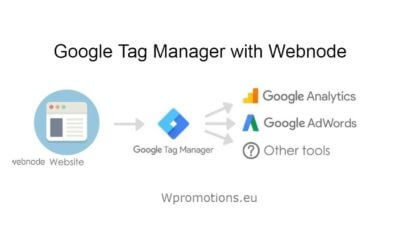
How to connect Google Tag Manager with Webnode website?
What is Google Tag Manager? and why you need it?Online marketing requires embedding of various measurement codes on your website or e-shop. In order to avoid having to insert each tracking code "manually" into the header or footer of the website, you can use the...

Jak skrýt nákupní košík v e-shopu Webnode?
Jak skrýt nákupní košík v e-shopu Webnode?Máte u společnosti Webnode vytvořený e-shop a chtěli byste skrýt nákupní košík v menu a tlačítko "Přidat do košíku", abyste mohli využívat e-shopové prvky jako např. přidávání produktů, avšak nechcete využívat e-shop jako...

