



Möchten Sie die URL Ihrer Webnode-Website in Ihre eigene Domain ändern, z. B. „meinweb.de“ oder „e-shop.meinweb.de“? Lesen Sie weiter!
Die Verwendung Ihrer eigenen Domain ist eine Premium-Funktion von Webnode, die Teil der Limited-, Mini-, Standard- und Profi Premium-Pakete ist.
Nach dem Kauf eines der Premium-Pakete können Sie dem Projekt eine eigene Domain zuweisen und die erforderlichen DNS-Einträge zum Einrichten einer Domain beim aktuellen Registrar Ihrer Domain erhalten.
Wenn Sie bereits Premium-Dienste gekauft haben, können Sie den Anweisungen folgen.
Anweisungen zum Zuweisen Ihrer eigenen Domain / Subdomain und zum Anzeigen von DNS-Einträgen in Webnode
1. Klicken Sie in der oberen Leiste des Editors auf „Einstellungen“ – „Domains“ – „bestehende Domain nutzen„.
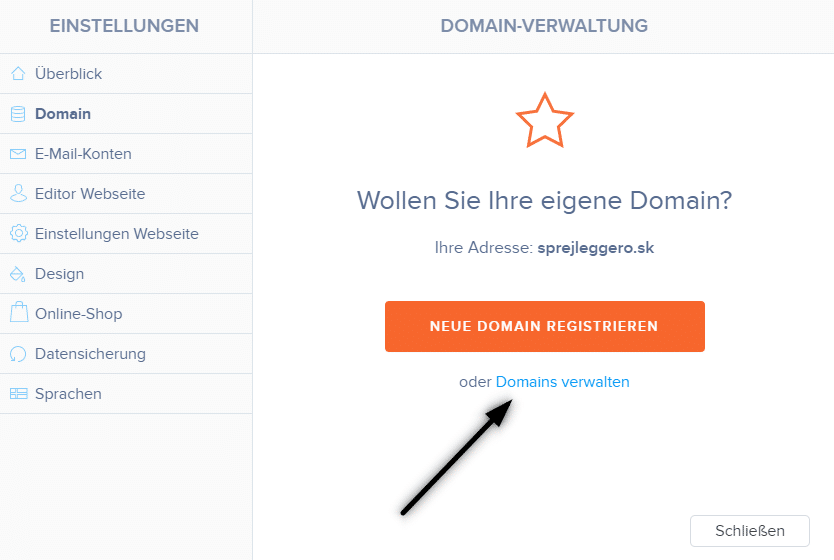
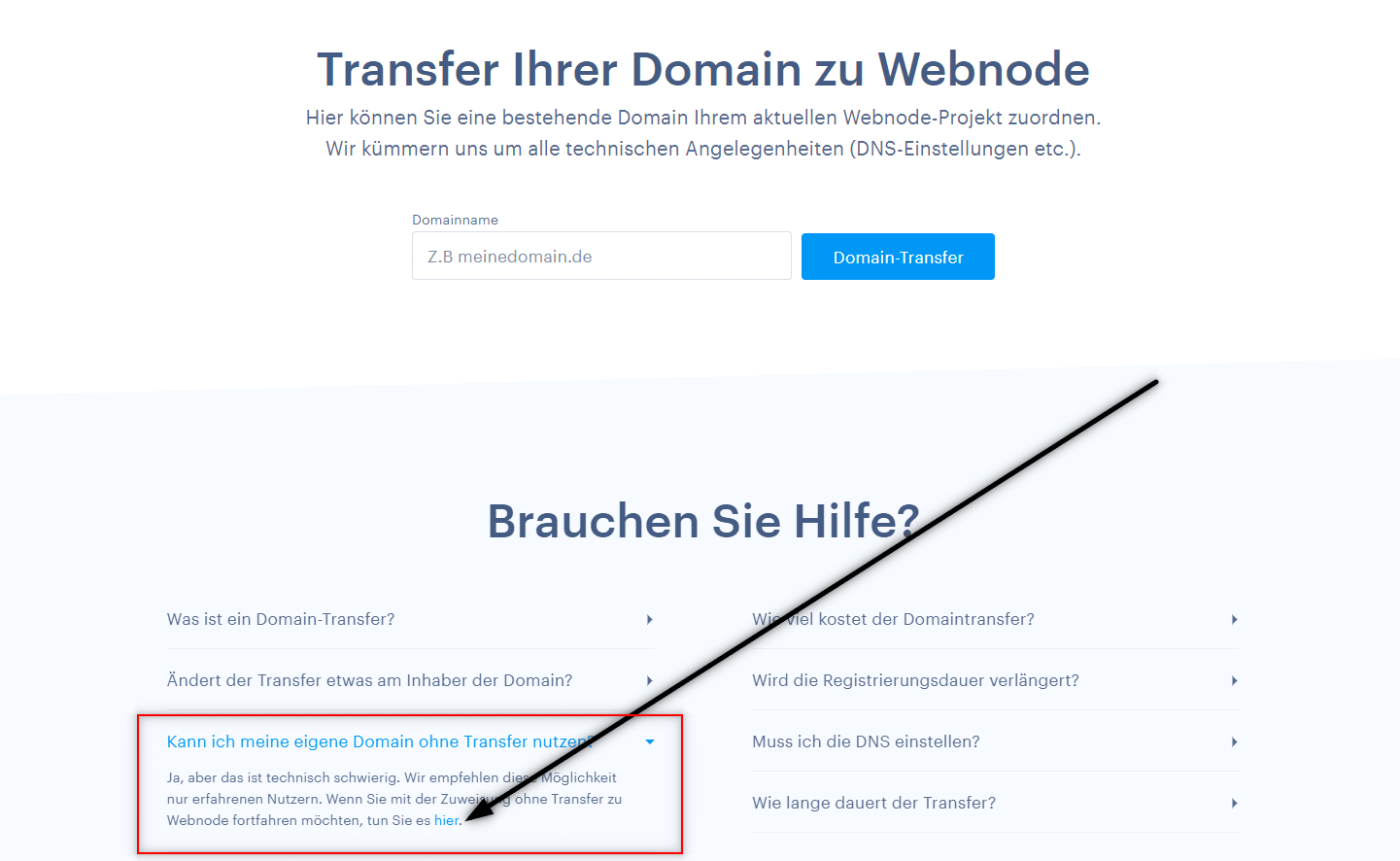
2. Scrollen Sie auf der Seite nach unten, erweitern Sie den Text “Kann ich meine eigene Domain ohne Transfer nutzen“ und klicken Sie im Text auf den Link hier.
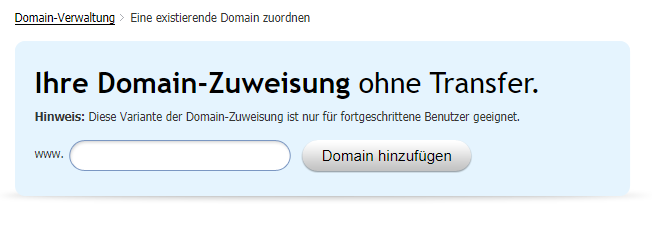
3. Geben Sie Ihren Domainnamen ein und klicken Sie auf „Domain hinzufügen„
4. Nach dem Zuweisen einer Domain sehen Sie die Anleitung. Stellen Sie die aufgelisteten DNS-Einträge für die Domain ein oder leiten Sie sie an den Support Ihres Registrars weiter und fragen Sie die Techniker nach den richtigen Einstellungen.
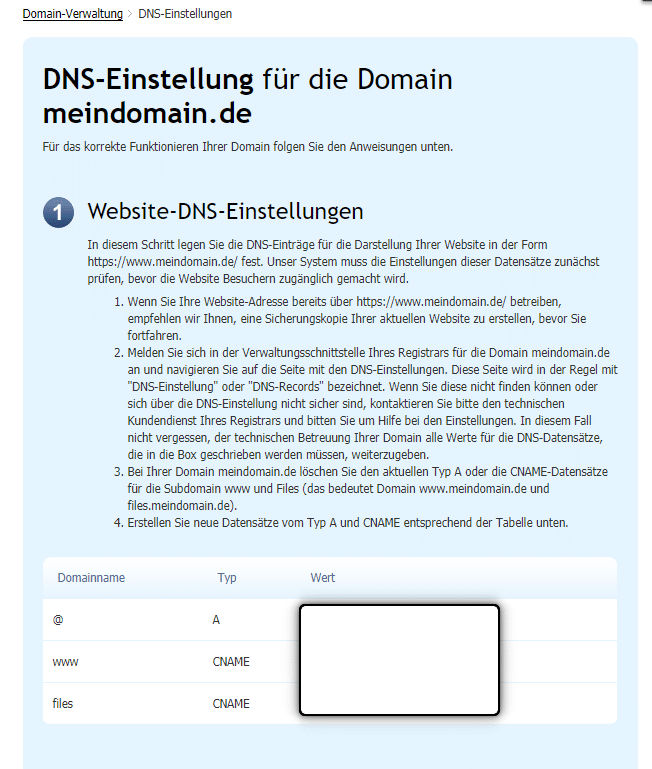
*Die DNS-Einträge sind für jede Domain unterschiedlich, sodass das Bild nur zur Veranschaulichung dient.
DNS-Einträge für eine Subdomain
Wenn Sie die Website unter dem Namen einer Subdomain wie „eshop.meinweb.de“ anzeigen möchten,
weisen Sie dem Projekt einfach eine Subdomain zu (gemäß den obigen Anweisungen) und:
Für die Subdomain „eshop.meinweb.de“ sehen die DNS-Einträge folgendermaßen aus:
- eshop A 192.168.xx.xx
- www.eshop CNAME meinweb.webnode.com.
- files.eshop CNAME files.meinweb.webnode.com.
Weitere tolle Tutorials


How to add a countdown timer in Webnode?
Countdown time in the WebnodeDo you need to add countdown timer HTML code to your website? Are you planning a wedding, party or opening a new restaurant and want to keep everyone on edge? No problem.1. Use the script to count down the time:xxx xxx On line no. 1 you...
How to avoid copying (stealing) from your website?
Do you want to avoid copying content from your website? This HTML code will allow your site to block the right click of the mouse on your site to prevent text copying. The keyboard shortcut (ctrl + c + ctrl + v) does not limit this, but it could discourage any...

How to connect Google Calendar to my website in Webnode?
Google Calendar - great help with organizing your time Google Calendar is a web application for organizing your time. In this tutorial, we'll learn how to insert Google Calendar into a Webnode website. 1. The first step is to create an account with Google - here 2. ...
How to change the email in a Webnode contact form?
Do you need to change the email in the contact form in Webnode? The email in the Webnode contact form is pre-set to the email you use to log in to Webnode. If you want to change the email in the contact form, follow these instructions: 1. Login to the...

How do I easily link my Facebook to my website in Webnode?
Do you need to insert a widget for linking a Facebook site to a website? In tutorial How to add a social network icons (FB and Instagram) to the top of the Webnode website? I have shown an elegant solution for linking soc. networks with your website. Let's now...

Ako Vytvoriť Profesionálny E-mailový Podpis? Jednoducho a ZDARMA
Hľadáte spôsob ako si vytvoriť emailový podpis? (Gmail, Webmail, Outlook apod) Emailový podpis je nevyhnuteľnou súčasťou modernej komunikácie medzi zákazníkom a podnikateľom. Firemný email zvýši dôveryhodnosť v očiach Vášho potencionálneho klienta. Vytvorte si preto...
Jak přidat www stránku do katalogu firem Firmy.cz od Seznam?
Návod k registraci do katalogu firem Firmy.cz *Služba je zcela zdarma. V návode Jak přidat www stránku do katalogu firem Moje Firma od Google? jsme si ukázali jako Vaši firmu zaregistrujete do světově nejznámějšího a největšího katalogu Firem od Google. Pojďme se...

Jak přidat www stránku do vyhledávače Bing.com?
Hledáte způsob jak přidat Vaši www stránku do vyhledávače Bing.com? Čtěte dál! V návodech Jak přidat www stránku do vyhledávače Google? a Jak přidat stránku do vyhledávače Seznam.cz? jsme si ukázali jak propojit Váš web s Google a Seznam. Nyní se podíváme na...

Jak přidat ikony soc. sítí (FB a Instagram) do horní části na webu ve Webnode?
Hledáte způsob jak na webové stránky u Webnode vložíte ikonky soc. sítí do horní části webu? V návodech Jak propojit Facebook s webem? a Jak propojit www stránky se sociální sítí Instagram? jsme si ukázali jak Váš web můžete různými způsoby propojit se soc....

