


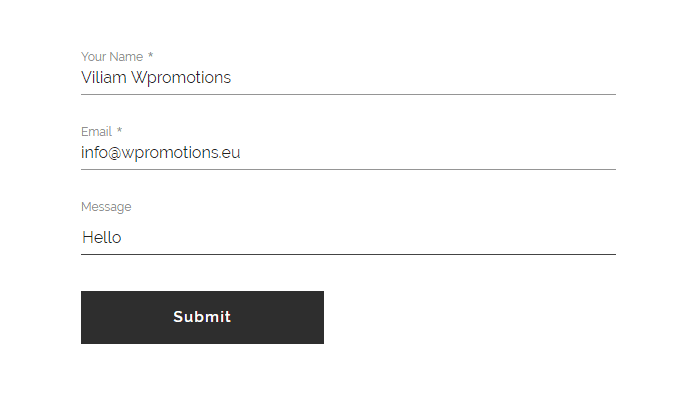
Do you need to change the email in the contact form in Webnode?
The email in the Webnode contact form is pre-set to the email you use to log in to Webnode.
If you want to change the email in the contact form, follow these instructions:
1. Login to the Webnode editor and click on the “Send” button on the contact form.

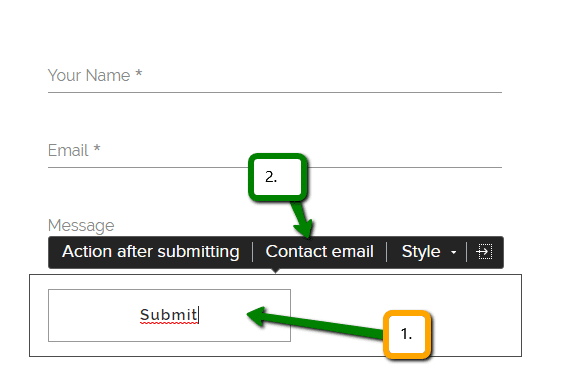
How to change an email in contact form in Webnode
2. Then click on “Contact email” and enter a new email.

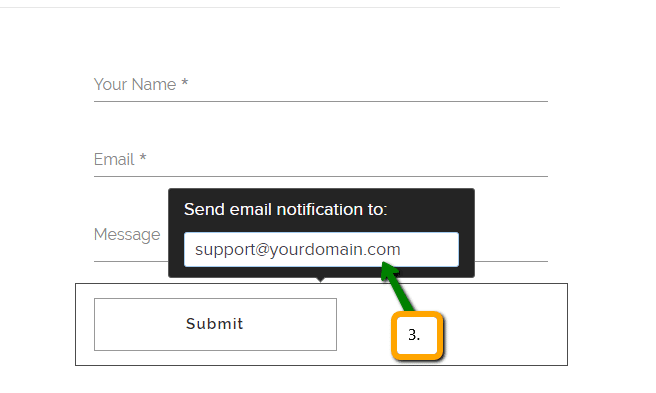
How to change an email in contact form in Webnode
3. Confirm the change by pressing ENTER.


How to change an email in contact form in Webnode
Well done! You have successfully changed the email in the contact form.
Email must be changed for each form on the web separately.
TIP: Add the Instagram and Facebook icon to the top left corner of the Webnode website. Read More in the tutorial: How to add a social network icons (FB and Instagram) to the top of the Webnode website?
TIP: Put online chat on the web for faster communication with visitors to your site. I recommend a service that is free – read more in tutorial for Smartsupp
More awesome tutorials


How to avoid copying (stealing) from your website?
Do you want to avoid copying content from your website? This HTML code will allow your site to block the right click of the mouse on your site to prevent text copying. The keyboard shortcut (ctrl + c + ctrl + v) does not limit this, but it could discourage any...

How to connect Google Calendar to my website in Webnode?
Google Calendar - great help with organizing your time Google Calendar is a web application for organizing your time. In this tutorial, we'll learn how to insert Google Calendar into a Webnode website. 1. The first step is to create an account with Google - here 2. ...

How do I easily link my Facebook to my website in Webnode?
Do you need to insert a widget for linking a Facebook site to a website? In tutorial How to add a social network icons (FB and Instagram) to the top of the Webnode website? I have shown an elegant solution for linking soc. networks with your website. Let's now...
Do you like this tutorial? Share it, please 🙂

