



Möchten Sie in Ihre Website Online-Chat einbinden, um schneller mit Ihren Kunden kommunizieren zu können?
In dieser Anleitung zeigen wir Ihnen, wie Sie den HTML-Code eines Online-Chats einfach und gratis auf Ihrer Website einfügen können.
1. Der erste Schritt ist die Registrierung auf der Website: https://www.smartsupp.com/de
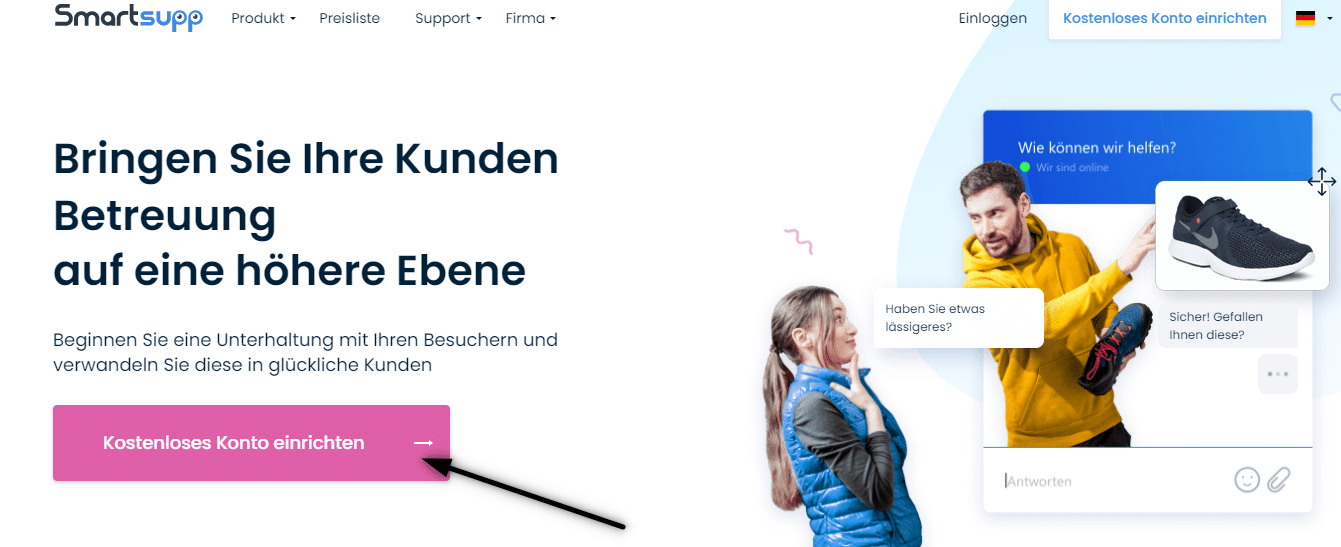

2. Um die Registrierung abzuschließen, überprüfen Sie Ihre E-Mail-Adresse und melden Sie sich an.
3. Klicken Sie dann auf diesen Link, der Sie zum Erstellen des HTML-Codes des Online-Chats weiterleitet: https://www.smartsupp.com/app/settings/chatbox/chat-code
4. Kopieren Sie den HTML-Code des Online-Chats
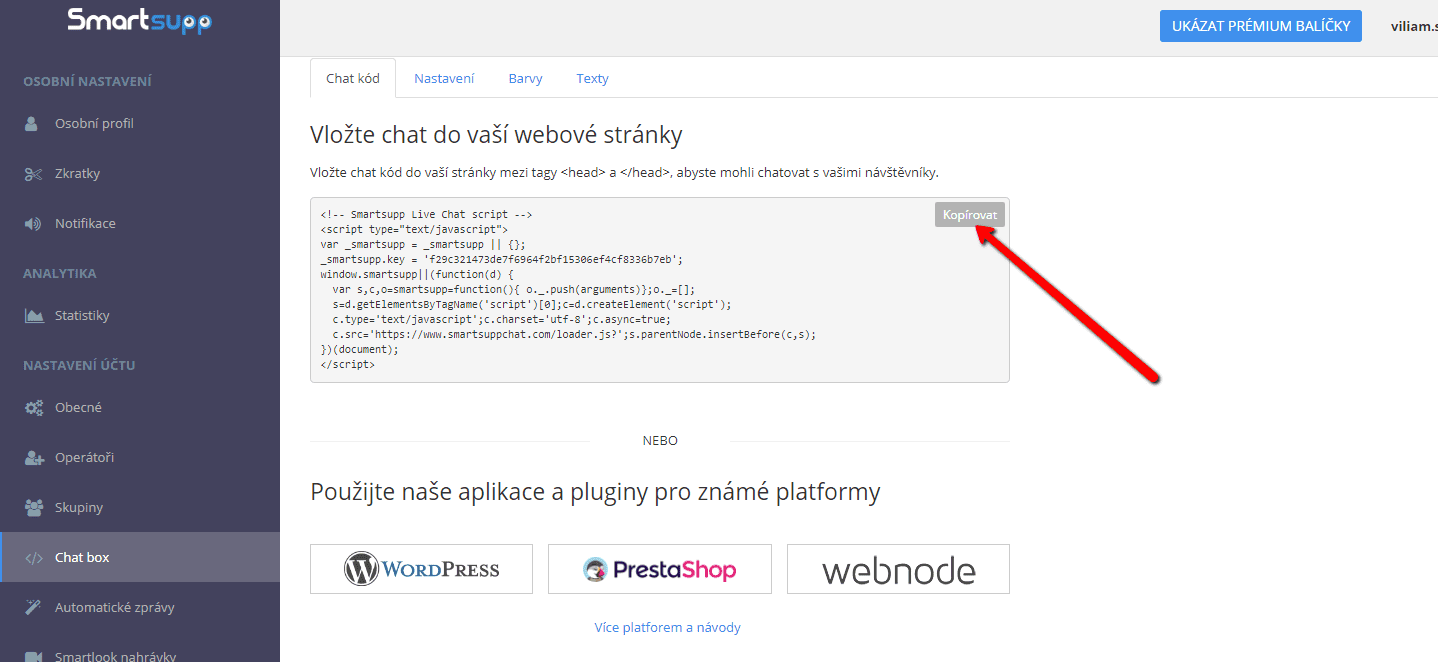

5. Fügen Sie den HTML-Code des Online-Chats in die Kopfzeile (<head> </head>) Ihrer Website ein.
Klicken Sie in der oberen Leiste des Editors auf „Seiten“ – Seite auswählen – „Einstelungen SEO-Seite“ – „HTML Code der Kopfzeile„
.

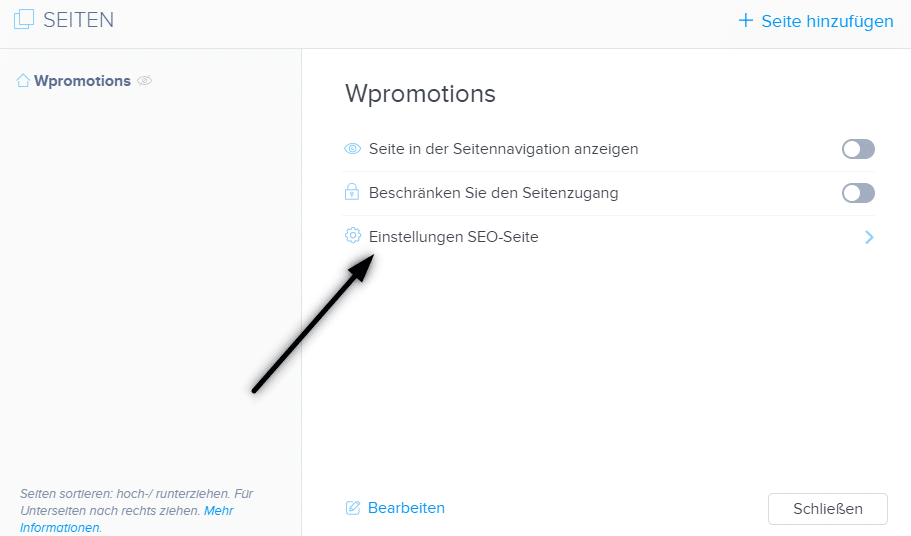
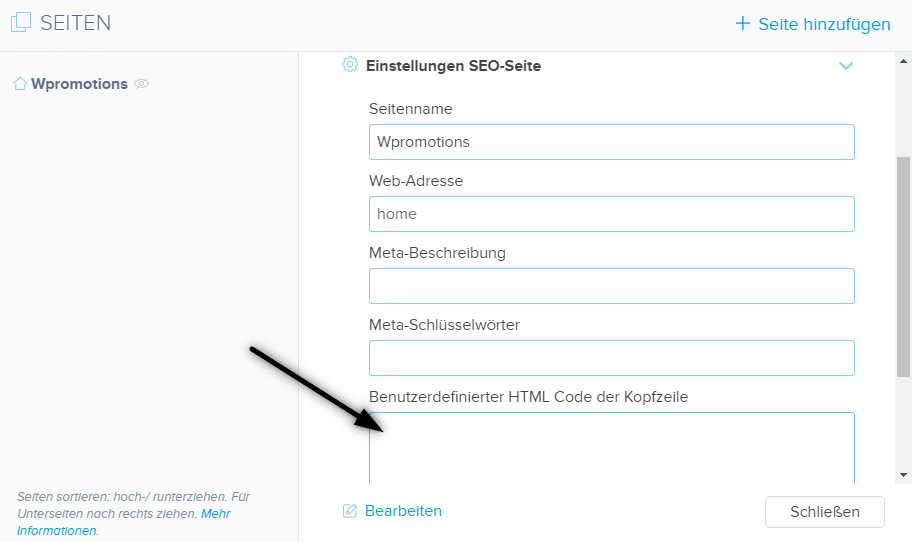
6. Veröffentlichen Sie Ihre Änderungen und Sie sind fertig. Ihr Online-Chat ist eingefügt und wird unten auf der Website angezeigt.

Weitere tolle Tutorials


Tvorba webu vo Webnode s pomocou umelej inteligencie (AI).
Webové stránky s Webnode a umelou inteligenciou (AI) Výhody tvorby webu pomocou použitia umelej inteligencie NÁVOD: Ako vytvoriť web vo Webnode pomocou umelej inteligencie? Migrácia webovej stránky k Webnode pomocou AI Užívateľské skúsenosti s tvorbou webu pomocou AI...

Google Business Sites have been discountinued. Webnode is a fast and easy alternative!
Google Business Sites - discountinued Google Business Sites - alternatives Webnode as an alternative to Google Business Sites Webnode AI migration tool A few words at the end Webnode as an alternative to Google Business Sites - Frequently Asked Questions (FAQ)Google...

Google Business Sites končí. Webnode je rychlá a jednoduchá alternativa!
Google Business Sites končí Google Business Sites - alternativy Webnode jako alternativa k Google Business Sites Webnode AI migration tool Pár slov na závěr Webnode jako alternativa k Google Business Sites - Časté dotazy (FAQ)Google Business Sites končíPokud jste se...

Google Business Sites končia. Webnode je rýchla a jednoduchá alternatíva!
Google Business Sites končia Google Business Sites - alternatívy Webnode ako alternatíva k Google Business Sites Webnode AI migration tool Pár slov na záver Webnode ako alternatíva k Google Business Sites - Časté otázky (FAQ)Google Business Sites končiaAk ste sa...

How to add reviews from Facebook to a website in Webnode?
Facebook Reviews in Webnode Facebook Reviews - free VS premium Facebook Reviews - choose the right type Facebook Reviews widget and Webnode e-shop/web TUTORIAL: How to add reviews from Facebook to a website in Webnode? A few words at the end Facebook Reviews HTML...

Jak přidat recenze z Facebook na web ve Webnode?
Facebook Recenze ve Webnode Facebook Recenze - zdarma VS premium Facebook Recenze - vyberte si ten správný typ Facebook Recenze widget a Webnode e-shop/web NÁVOD: Jak přidat recenze z Facebook na web ve Webnode? Pár slov na závěr Facebook Recenze HTML Widget - Časté...

Ako pridať recenzie z Facebook na web vo Webnode?
Facebook Recenzie vo Webnode Facebook Recenzie - zdarma VS premium Facebook Recenzie - vyberte si ten správny typ Facebook Recenzie widget a Webnode e-shop/web NÁVOD: Ako pridať recenzie z Facebook na web vo Webnode? Pár slov na záver Facebook Recenzie HTML Widget -...

Hogyan adj Google Véleményeket a weboldaladhoz
Google Vélemények a Webnode-ban Google Vélemények - Ingyenes VS Prémium Google Vélemények - Válaszd ki a megfelelő típust Google Vélemények Widget és Webnode webáruház/Weboldal TUTORIAL: Hogyan adjunk hozzá Google véleményt a Webnode weboldalunkhoz? Néhány szó...
How to add notification pop-up widget in Webnode? FREE!
Notification pop-up in Webnode Notification Pop-up window - free VS premium Notification pop-up window - choose the right type Notification Pop-up window and Webnode e-shop/web Pop-up window - also works on mobile/tablet TUTORIAL: How to easily add a pop-up in...

