
Do you want to attract your audience?
Would you like to improve your website?
I have created a code for you that will allow you to display an animation of a writing pencil on your website or e-shop in WEBNODE.
You can choose your own text in the code so that the pencil writes exactly what you want! 🙂
DEMO
Wpromotions.eu is 
- Please subscribe to William Promotions Newsletter and get a code.

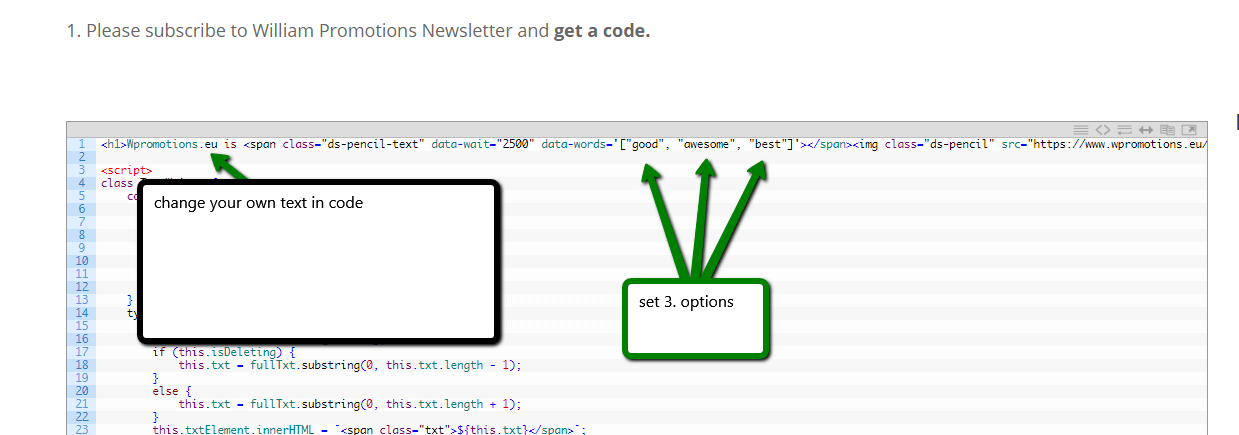
2. Edit the text in code – set your own. Then log in to web editor Webnode and paste the code where you want the pencil to appear.
Set your own text so that the pencil writes exactly what you want! : D
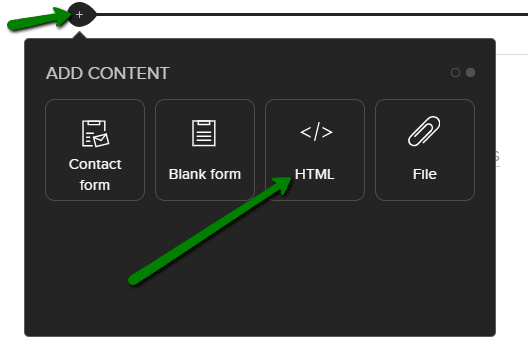
Paste the code in WEBNODE using the “+” and “HTML”
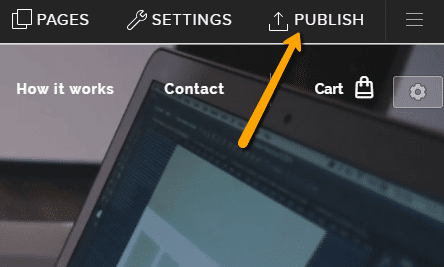
3. Publish changes:
YOU ARE DONE – Your new writing pencil appears in the published version of your website.
Please write me in comments below if you are satisfied with this animation, I will be happy for any feedback.
Thank you for subscribing! Don’t forget to subscribe to my Facebook and YouTube for more great tutorials, tips and tricks 🙂
More awesome tutorials

How to connect Google Calendar to my website in Webnode?
Google Calendar - great help with organizing your time Google Calendar is a web application for organizing your time. In this tutorial, we'll learn how to insert Google Calendar into a Webnode website. 1. The first step is to create an account with Google - here 2. ...

How to change the email in a Webnode contact form?
Do you need to change the email in the contact form in Webnode? The email in the Webnode contact form is pre-set to the email you use to log in to Webnode. If you want to change the email in the contact form, follow these instructions: 1. Login to the...

How do I easily link my Facebook to my website in Webnode?
Do you need to insert a widget for linking a Facebook site to a website? In tutorial How to add a social network icons (FB and Instagram) to the top of the Webnode website? I have shown an elegant solution for linking soc. networks with your website. Let's now...
Do you like this tutorial? Share it, please 🙂