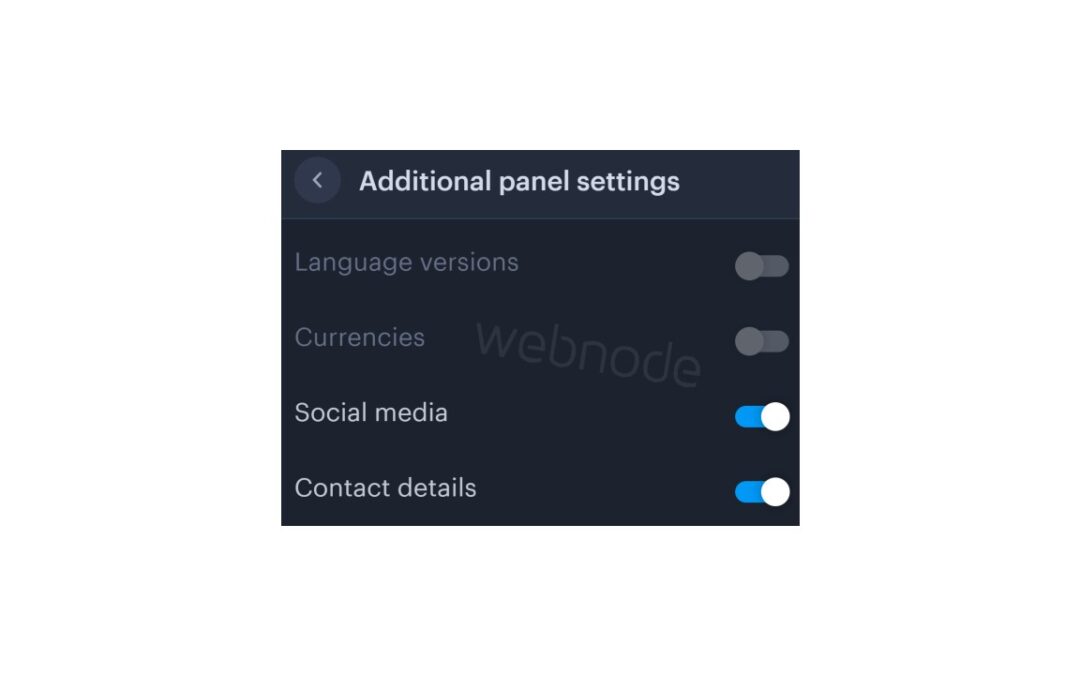
You can easily add top bar with contact information, social networks icons or a currency switcher (in the e-shop) or a website language switcher (flags).
In our Webnode Free News i was talking about 5 new features of the NEW Premium Business Package and 6 best WEBNODE templates for web design. You can read it later.
Webnode adds new features very oftenly, and Webnode editor is developing very quickly.
Let’s take a look at how Webnode surprised its users this month.
Webnode users can now add a top bar (additional header bar) very easily
It’s awesome, isn’t it?
Top bar, which can be turned on with one click, contains several settings.
Entrepreneurs who need to have a phone number or email visible on the web will certainly appreciate this new feature.
Influencers ,in turn, enjoy a great function for adding social networks icons directly into TOPbar.
It is also possible to change the background of the top bar without any problems and adapt everything to your brand.
And what will you be able to set in the top bar?
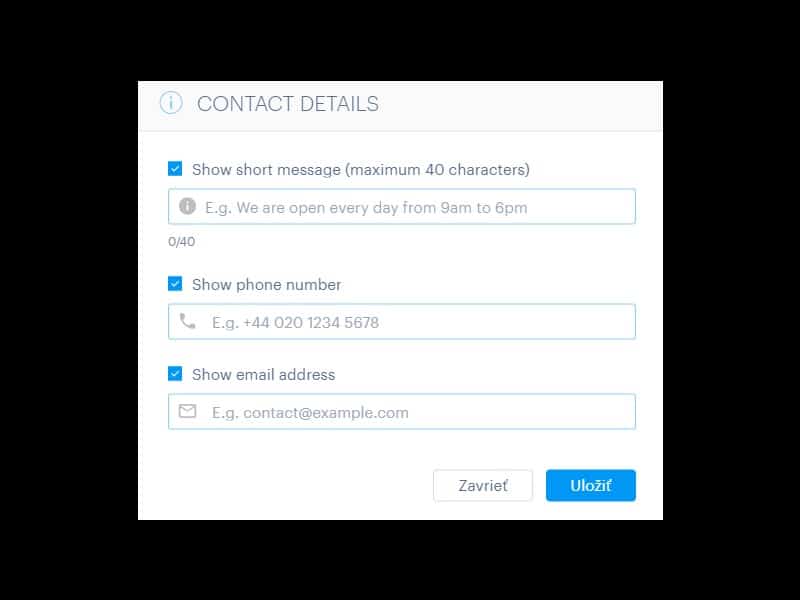
- Phone no
- Short text e.g. opening hours (max. 40 characters)
- Social networks icons
- Language switcher (flags)
- Currency switcher (for e-shop)
Tutorial: How to easily turn on top bar on your Webnode website?
1. Sign in to Webnode and go to website editing.
Click on the gear wheel in the top bar of the MENU and select the “Advanced settings” option.
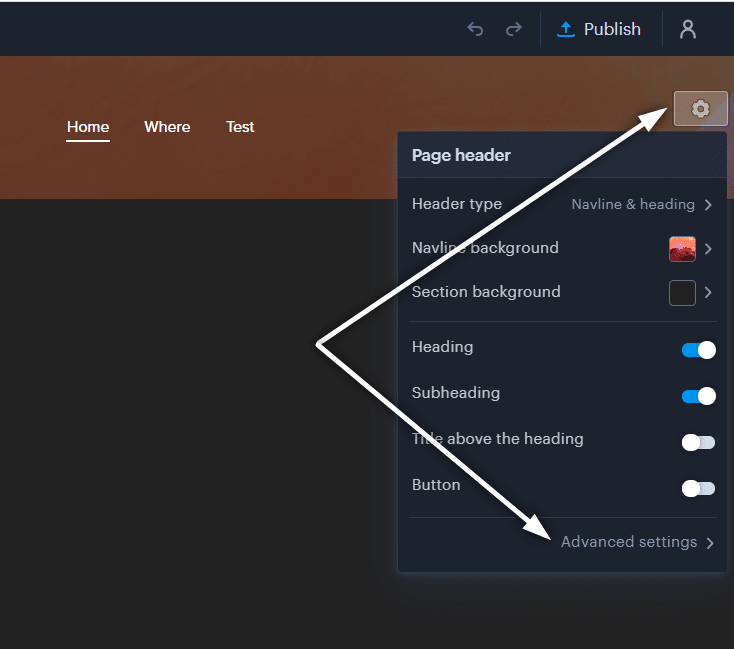
2. Select the “Additional panel settings” option
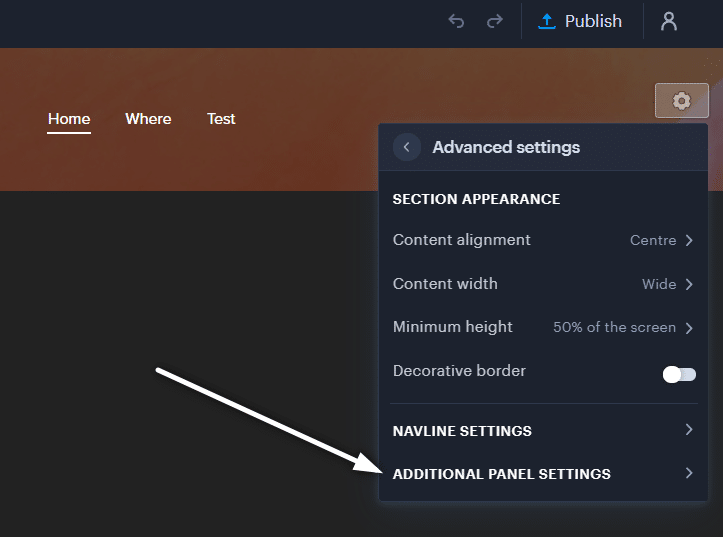
3. Use the switch to turn on which functions you want to have in the top bar.
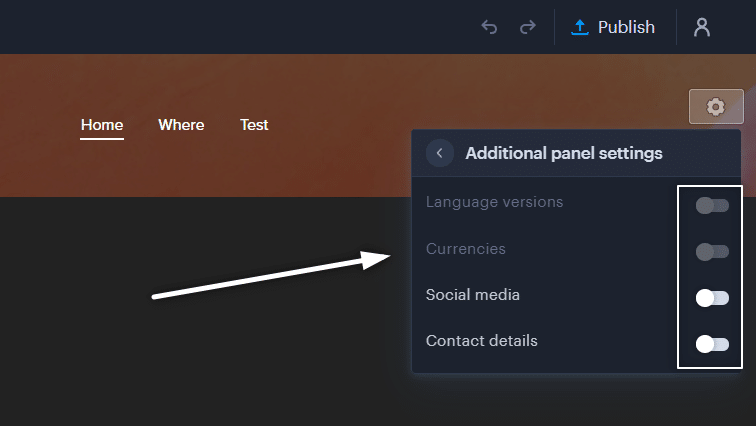
4. Done, now just click on the top bar and fill in your details.

A few words in conclusion
Adding a top bar is very easy. Anyone can manage it without any problems.
I hope you enjoy the new TOP BAR function. Dont forget to use its potential for one hundred percent!
Do you like the new top bar feature?
Write me your opinion in the comments below.
And for those who don’t like this feature for some reason and want something different in the top bar – don’t hesitate to contact me, we can disquss it.
I keep my fingers crossed for everyone in the online business.
Have a lot of fun with the Webnode editor.
More awesome tutorials

12 biggest free pictures stocks for commercial use. Pictures for free.
In this tutorial you will find links to 12 free photo services. All images are licensed under CC0 license. ✔ Images are for commercial use. If you've downloaded images through Google, it's wrong! When you are creating own website, I recommend you these 12 free sources...

How to add Webnode website to Search engine Bing.com?
Looking for a way to add your website to Bing.com? Read more! In tutorial How to add a Webnode website to Google Search? I have shown how to link your site to Google. (automatic index) Now let's look at Bing.com. Bing.com is the second most used search engine and...
How to download an invoice in Webnode?
Are u looking for your invoice for paid services at Webnode? In this tutorial I will show you exactly where you will find your invoice in Webnode. You can download the invoice directly in your project's administration. (cms) Important note: Only the site owner (the...
How to easily edit the content of 404 page in Webnode?
Looking for a way to edit page 404 (page not found) in Webnode? In this tutorial, you will learn how to edit the 404 Webnode page. Page 404 is important if a link to your site no longer exists. Page 404 will always appear whenever a visitor visits a non-existent page...

How to add a conversion code in Webnode?
Looking for a way to embed a conversion code for Webnode from Adwords, etc. ? What is that conversion? Simply: Conversion is something you want a visitor to do on your site (filling in a form, purchasing a product in an e-shop, etc.) Conversion is the...

How to add a social network icons (FB and Instagram) to the top of the Webnode website?
You are looking for a way to insert the social icons at the Webnode website? (to the top of the site) In tutorials How do I easily link my Facebook to my website in Webnode? and How to link your Instagram with website in Webnode? I've shown how you can link...

How To Create A Professional Email Signature? Simply and FREE
Looking for a easy way to create an email signature? (Gmail, Webmail, Outlook, etc.) Email signature is an inevitable part of modern communication between the customer and the entrepreneur. Business email will increase credibility in the eyes of your potential...

How to add link to an email and phone number in Webnode?
Do you need to add a link to an email or phone number on the site created with Webnode? Email communication is a fast, simple and most commonly used link between you and your customers. For most potential customers, however, the main task is time, which can lead to...

How to create anchor links in Webnode? Click&Scroll
Videotutorial with ENG subtitles The anchor works as a link within a single page. You do not see a different page (web) through the link, but you will be taken to another place on the page you are currently viewing. Anchor formation (tabs) is divided into two...