Would you like to add your own footer to the web / e-shop in Webnode?
With my simple tutorial, you will definitely be able to do it. Just subscribe to the newsletter and get the code.
Edit the URL and text in my code and paste it into the footer of all pages of your website 🙂
2 easy steps:
1. Get the code and edit (so that the code contains the correct URLs)
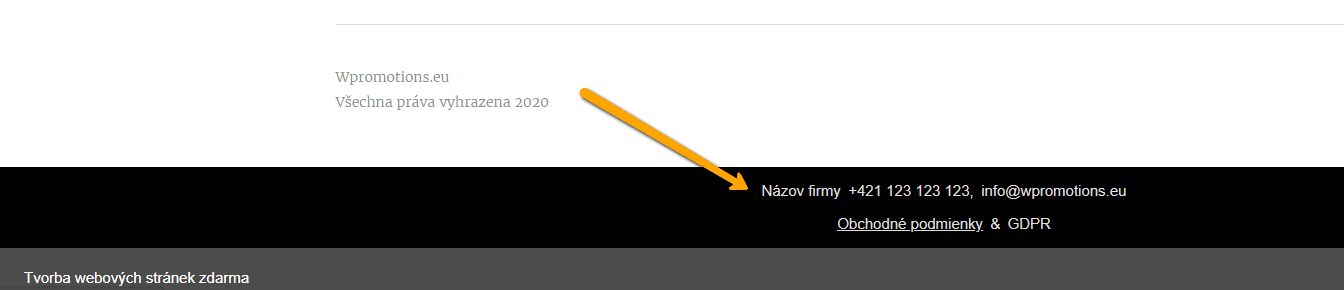
Example of own footer in Webnode with a link to the company name, phone number, email + T&S & GDPR.
Let’s do it!
- Please subscribe to the news on my website and get a pre-prepared code:

2. Edit the URLs and footer text to make everything work properly with your site.
- On line no. 47 change the URL and Company Name
- On line no. 48. change phone no
- On line no. 49 change email
- On lines no. 54 and no. 55 edit the URLs for the terms and conditions and GDPR.
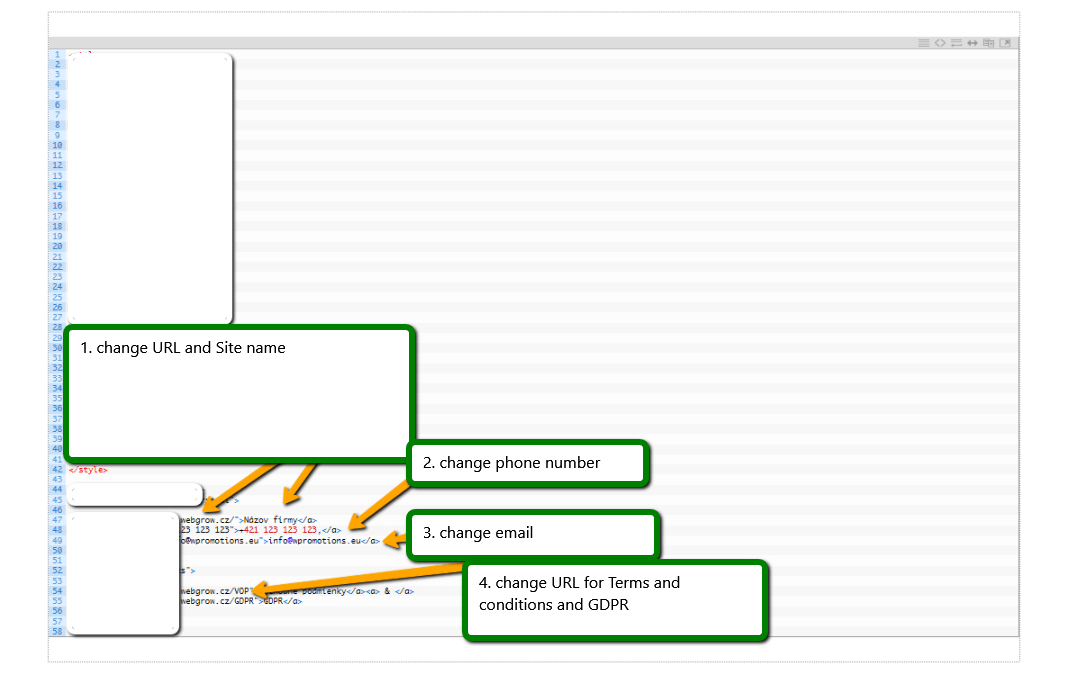
TIP: If you would like to have a link in the footer only to the terms and conditions + GDRP, then delete line no. In the code. 47,48,49.
3. If you have a code, copy and paste it into the header of all pages.
Choose how you enter the code, depending on which Premium Plan you have purchased from Webnode:
1. I have purchased Premium Plan STANDARD or PROFI
If you have purchased Standard or Profi Premium Plan from Webnode, you can paste the code into all pages of the site with a single paste.
At the top of the editor, click “Settings” – “Website Settings” – “HTML Header / Footer” – “HTML Footer“.
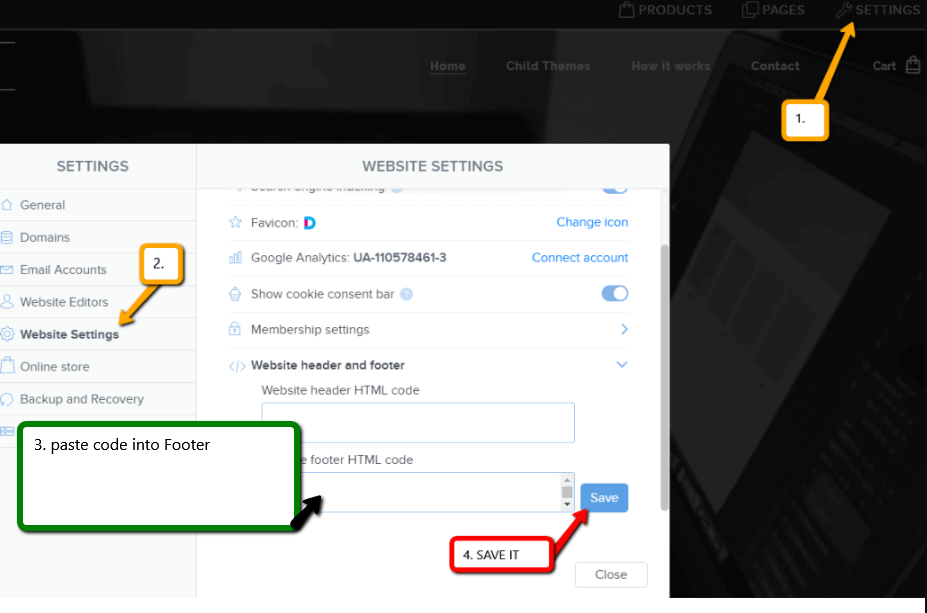
Save changes and you are done – footer is working in pubished version of your Webnode website.
2. I have a project in the Free version or I have purchased the Premium Plan Limited, Mini.
If you have a website / e-shop created in the Free version or you have purchased the Limited or Mini Premium Plan, then you must insert the code in the footer on each page separately.
1. Paste the code in the footer of each page:
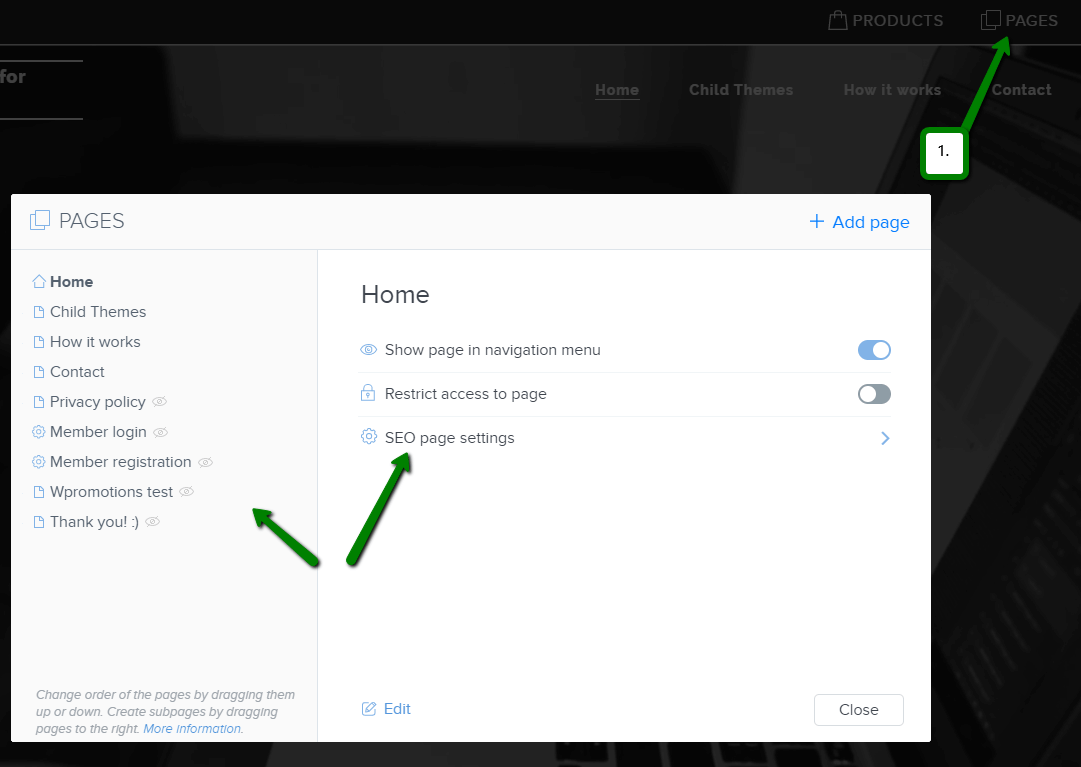
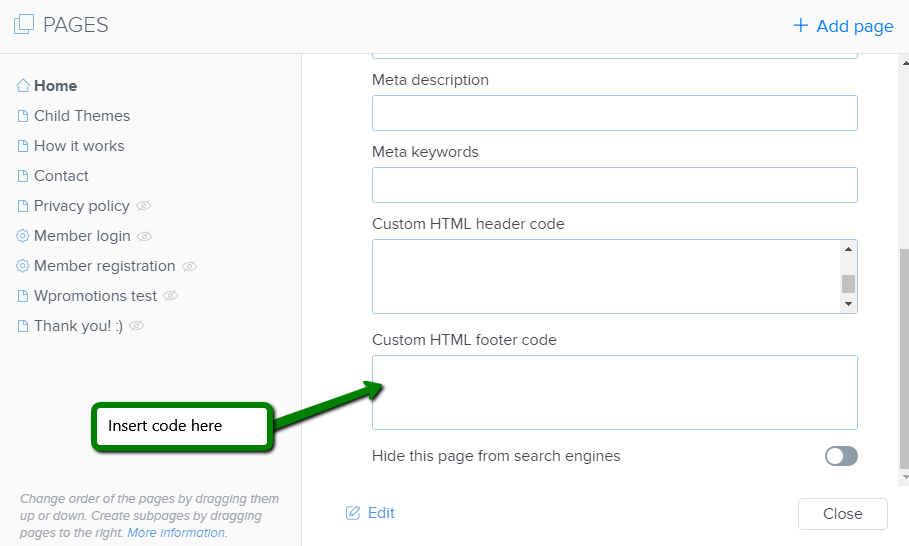
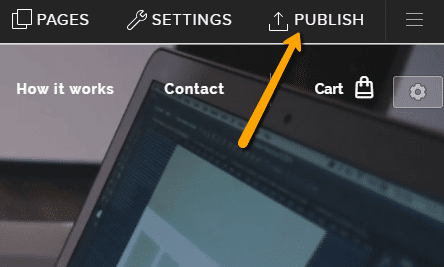
Great job! Now, publish the changes and you’re done 🙂
More awesome tutorials

How to download an invoice in Webnode?
Are u looking for your invoice for paid services at Webnode? In this tutorial I will show you exactly where you will find your invoice in Webnode. You can download the invoice directly in your project's administration. (cms) Important note: Only the site owner (the...

How to easily edit the content of 404 page in Webnode?
Looking for a way to edit page 404 (page not found) in Webnode? In this tutorial, you will learn how to edit the 404 Webnode page. Page 404 is important if a link to your site no longer exists. Page 404 will always appear whenever a visitor visits a non-existent page...

How to add a conversion code in Webnode?
Looking for a way to embed a conversion code for Webnode from Adwords, etc. ? What is that conversion? Simply: Conversion is something you want a visitor to do on your site (filling in a form, purchasing a product in an e-shop, etc.) Conversion is the...

How to add a social network icons (FB and Instagram) to the top of the Webnode website?
You are looking for a way to insert the social icons at the Webnode website? (to the top of the site) In tutorials How do I easily link my Facebook to my website in Webnode? and How to link your Instagram with website in Webnode? I've shown how you can link...

How To Create A Professional Email Signature? Simply and FREE
Looking for a easy way to create an email signature? (Gmail, Webmail, Outlook, etc.) Email signature is an inevitable part of modern communication between the customer and the entrepreneur. Business email will increase credibility in the eyes of your potential...

How to create anchor links in Webnode? Click&Scroll
Videotutorial with ENG subtitles The anchor works as a link within a single page. You do not see a different page (web) through the link, but you will be taken to another place on the page you are currently viewing. Anchor formation (tabs) is divided into two...

How to add a Webnode website to Google Search?
Add a Webnode website to Google Search Engine We're all familiar with Google search engine, and it's not necessary to introduce it in any way. Search engines roam web pages regularly, and when they find a new site, they automatically add it to their search results. If...

How to add link to an email and phone number in Webnode?
Do you need to add a link to an email or phone number on the site created with Webnode? Email communication is a fast, simple and most commonly used link between you and your customers. For most potential customers, however, the main task is time, which can lead to...

How to add a discussion on a Webnode website? (DISQUS)
YouTube Video Tutorial (english subtitles) How to easily create a discussion using - disqus.com In this tutorial, you will learn how to place a discussion on the Webnode website so yours visitors can add comments to the site. We will use an external application - HTML...
Do you like this tutorial? Share it, please 🙂